The Desktop of Tomorrow:
From User-Centered to
Information-Centered Computing
Norman
Meyrowitz
Institute for Research in Information and Scholarship (IRIS)
Brown University
155 George Street
Box 1946
Providence, RI 02912
July, 1989
Minor Updates
December, 1990
Draft 0.95
Abstract
How do companies like Apple and Microsoft pull the next rabbit out of the hat without upsetting those who like the current rabbit just fine? How does one make a substantial improvement to a user interface metaphor that has been touted and accepted as a substantial improvement over previous user interfaces? This paper attempts to outline a vision of the next levels of integration of the Macintosh, Windows, OpenLook-style desktop interface, pointing out many incremental changes and additions that independently will feel natural to those who have invested their cognitive stake on the desktop of the 80s, but when taken together will provide a substantially new and coherent infrastructure of the 90s.
1. Introduction
Part of the promise of the personal workstation is to transform data into information so that users can transform information into knowledge. As Richard Saul Wurman aptly put it more than a decade ago, an abundance of data is not always a boon. "Everyone spoke of an information overload," he said, "but what there was in fact was a non-information overload."
The desktop metaphor, created in its near-present form close to ten years ago, but the product of close to 50 years of thought and vision, was created to help address the problem of better access to and better creation of information using a computer. Today millions of individuals use the desktop user interface to develop and retrieve information in a way that they were unable to do with previous interfaces.
1.1 The Desktop Grows Up
Yet it has become macho for pundits to state that the desktop metaphor is on its deathbed — it has reached its maximum capability in aiding the user, and a wholesale replacement had better be on the horizon "real soon." Some of these pundits are actually those vendors who don't have desktop interfaces and would just as soon skip a generation than go through the effort of building one. Others, on the other end of the spectrum, are those that have large installed bases of users familiar with an existing desktop interface, and who see it easier to create a new interface from scratch rather than extend the desktop interface and keep it backwards compatible.
The desktop metaphor, however, has not reached old age. Rather, it has simply reached puberty. Like an adolescent, the desktop interface is gangly, awkward, and often doesn't do what you asked it to do. Few parents have the opportunity to discard their teenagers (though many may have fantasized such on occasion), and one must expect that few computer companies will have a chance to discard their interfaces in the near future. Part of the parenting process is aiding in the transition from childhood to maturity, and companies like Apple and Microsoft now must concentrate on taking the desktop through these wonder years.
This paper attempts to look at the desktop of tomorrow from the following vantage points:
• How can we extend the existing metaphor, rather than discard it, along with all of the expertise and training that has gone into it?
• How can we meld a variety of technologies, rather than use a single "popular" one, to empower the users?
• How can we make sure that hardware and processors are built to support a software vision, not vice versa?
• How can we make sure that the main purpose of the new desktop is enabling users to accomplish their tasks, not simply providing provocative technology?
• How can we develop a desktop interface that allows users to find and discover information that may not be on their local desktops?
• How can we assure that the desktop interface remains user-centered but also becomes information-centered?
This paper first provides an historical perspective on the desktop metaphor, and then discusses the data and the activities that users typically need in their daily work. It focuses on these areas by discussing the specific requirements and our suggestions for how these requirements can be met by user interfaces and technologies in the future. It follows with a discussion of the architecture that will be necessary to make this possible. Finally, a conclusion provides some overall observations about the future of the desktop and examines the feasibility and timeframe of the work to be done.
2. The Desktop — Updating the Vision
2.1 Historical Perspective
The desktop environment is the result of years of accumulated vision on the part of many pioneers in computing. Vannevar Bush, as early as 1932, anticipated the development of technology that would allow individuals to have, on a console at their fingertips, all the world's knowledge, and to create coherent associations between segments of this knowledge.
In the early 1960s, Licklider of MIT, a pioneer in the development of information retrieval systems, wrote an article that predicted the creation of online libraries in which users would be engaged in browsing, retrieval, and creation of new knowledge.
In the mid 1960s, Doug Engelbart undertook a massive effort at SRI in order to augment man's intellect with computer tools, and through his work, invented things like the mouse, multiple simultaneous windows of information, outline processing, network-wide hypertext, etc. Engelbart's work was the first large-scale attempt to use computing technology for the express purpose of enabling both individuals and groups of individuals working together. His notions of connectivity and of multiple views of information carry forward to today and are still largely unrealized.
In the mid to late 1960s, Ted Nelson coined the word "hypertext" to associate the non-linear materials that the computer could finally allow individuals to create easily. His books Computer Lib/Dream Machines and Literary Machines provided a conceptual blueprint for a computer environment for the user that provided deep integration of thoughts and ideas and multiple media in which to express those thoughts and ideas.
By the mid 1970s, Xerox's Palo Alto Research Center had pushed the notion of personal computing, with the Alto workstation and the Ethernet network. On the Alto, many personal productivity tools flourished. One of the most influential was Bravo by Charles Simonyi, et al., a pioneering, sophisticated WYSIWYG text editor that pioneered styled "looks" and piece-table technology. Alan Kay, Adele Goldberg, Dan Ingalls and others created Smalltalk, an extremely integrated object-oriented environment, one of the goals of which was to provide a seamless integration between productivity applications and programming. Smalltalk pioneered the use of multiple overlapping windows, allowing the user to deal with more than one context at a time. At the same time, Larry Tesler, with help from Peter Deutsch, solved the age old problem of how to point to text characters on the screen while developing the Gypsy editor. The idea of an insertion point between characters, as commonplace as this seems today, made way for easy selection of spans of characters, and more broadly, in the generalization of selection as a fundamental paradigm.
In later instantiations of Smalltalk, user interface issues became paramount. Browsers, which provided direct manipulation interfaces to file traversal, pop-up menus, selection as a basic and important system concept, and an integrated language in which users could modify the behavior of the system all began to provide a more powerful interface. Most importantly, Smalltalk articulated the concept of modelessness for the first time. The Teslerian tenet — "don't mode me in" — demanded that the user should always be in a state that he or she could easily comprehend. The user should always have a familiar environment, and should never get transported to an alien land from which, like Dorothy in Oz, it was impossible to return without some secret incantation. This notion of modelessness, coupled with many things occurring on the screen at the same time in overlapping windows, enhanced the number of activities users could undertake successfully at any given time. The Xerox systems also pushed the state-of-the-art in communications, by factoring the notions of file servers, electronic mail, electronic messaging, and shared printing into the desktop environment.
By the early 1980s, the closest ancestor to today's desktop environment — the Xerox Star interface — grew out of the previous work at PARC.
Several design goals permeated the Star:
• The designers determined that users should simply point to specify the task they wanted to invoke, rather than remember commands and type key sequences. They believed that the user should not need to remember anything (of consequence) to use the system.
• An important consideration was the development of an orthogonal set of commands across all user domains; the copy command in the text formatter, for example, should have similar semantics to one in the statistical graphing package.
• The system was designed to operate by "progressive disclosure." Star strived to present the user with only those command choices that are reasonable at any given juncture.
• Finally, Star was an interactive editor/typesetter; the screen was, for the most part, a facsimile of what the final document would look like.
The Star development team, which worked several years considering possible models, remarked:
The designer of a computer system can choose to pursue familiar analogies and metaphors or to introduce entirely new functions requiring new approaches. Each option has advantages and disadvantages. We decided to create electronic counterparts to the physical objects in an office: paper, folders, file cabinets, mail boxes, and so on—an electronic metaphor for the office. We hoped this would make the electronic "world" seem more familiar, less alien, and require less training. (Our initial experiences with users have confirmed this.) We further decided to make the electronic analogues be concrete objects. Documents would be more than file names on a disk; they would also be represented by pictures on the display screen. [From "Designing the Star user interface" by D. C. Smith, C. Irby, R. Kimball, B. Verplank, and E. Harslem in April 1982 issue of BYTE magazine, ©1982 Byte Publications, Inc.]
For the personal computer user in 1983, familiar with either a CP/M, Apple II, or MS-DOS command line interface, it was the original Lisa desktop metaphor, the forerunner of today's Macintosh desktop, that opened new vistas for the masses, in that the computer changed from a data-centered box to a user-centered box.
Drawing on the work of the Xerox Smalltalk and Star interfaces before it, the Lisa pushed the metaphor of a direct-manipulation interface. Some have called this an icon-based interface, but in fact, icons were but one of the components of the vision. Most importantly, the desktop metaphor enforced the notion of a single focus at any given time — the selection — to which operations, typically chosen from a pull-down menu or keyboard/mouse equivalent, could be applied.
This interface was most obvious in the Finder, where icons represented the common nouns of the office — files, folders, trash cans, and tools — and menu items, representing the common verbs of the office — open, close, save — operated upon the nouns. Multiple, overlapping windows allowed several folders to appear on the screen simulating the pieces of paper on a desk. The notion was to make as modeless an environment as possible: one didn't get caught in printing mode or delete mode or edit mode.
The Finder represented the formerly difficult world of the hierarchical file system directory through an intuitive interface in which folder icons could be opened to reveal windows that contained nested folders and documents, which themselves could be opened. The user never had to explicitly specify nodes in a tree; rather, the user perused the tree by actually traversing it through the action of opening folders and documents. Yet the Finder, while based upon direct manipulation in many ways, missed several important features that might have made it easier to use.
The themes of the first desktop metaphor were:
• Modelessness
• Consistency
• Progressive disclosure
• Icon-based representation
• Selection/menu (noun/verb) interface
• What-you-see-is-what-you-get (direct manipulation)
The desktop user interface freed users from the bondage of idiosyncratic keyboard interfaces. Today the desktop on the Macintosh is a still powerful metaphor, but one whose potential has been stunted by the legacy of the tiny machine (128K of memory with a 342 x 512 pixel screen) on which the desktop metaphor was released. Microsoft Windows uses a different look and feel from the Xerox Star and the Macintosh, but largely is based on the same design contraints. The design constraints are limiting because they focus on:
• Individual users rather than groups of users;
• Standalone, rather than networked computing;
• Rigidity, rather than flexibility, in both views and operations at the Finder level;
• Insularity of data from other data;
• Insularity of applications from other applications;
In subsequent sections, this article hopes to identify the
themes which are vital in overcoming these limitations and extending the life
and functionality of the metaphor.
2.2 The Themes of Tomorrow
The updated vision of the desktop must be one that continues to uphold the traditions of the rich past of Bush, Engelbart, Nelson, Kay, Simonyi, Smith, Tesler, and others. But it must seek to uphold those traditions by addressing themes that have always been part of the vision, but have not yet been given sufficient emphasis in practice.
We believe that these critical themes are:
• Integration
• Aesthetics
• Perspective
• Access
• Service
• Community
• Adaptation
By integration we mean the ability of the system to not treat data as separate, private islands, but as components that can be easily linked, associated, combined, and incorporated through the use of general desktop support. Similarly, applications should not be treated as insular processing elements, but should be part of a structure in which they become tools that are used jointly, rather than separately. This goes much further than the copy and paste of today.
By aesthetics we mean the ability of the system to have an innate aesthetic that allows the user to become both familiar and intimate with the way the system. Part of this is a visual aesthetics — how the system looks. This requires making the information that is presented to people conform to the highest graphical design ideals. This may require changing part of the look and feel to make the fonts, icons, and controls a less overpowering part of the interface. It will require innate system support that lets users develop information with superb design as the default. The other part of this is an operational aesthetics — how the system feels. It will require continuing to enforce policy across applications that maintains consistency, reliability, familiarity, and direct-manipulability.
By perspective we mean the ability of the system to provide the user with not just a single viewpoint of the data/information space, but a variety of views, each of which provides an important slant on the data. User's should not feel enslaved by the metaphor; rather, the metaphor must be fluid enough to provide for a variety of vistas.
By access we mean the ability of the system to allow the user to determine what data exists in the system, explore it, browse it, retrieve it, and store more of it. The system needs to provide a variety of techniques for storing and indexing the data so that the user can retrieve it in any number of different ways — through query by name, content, keyword, or attribute. It needs to provide access to local data sources and remote data sources in a consistent manner. Access also means that the desktop environment itself should be able to be examined, queried, and manipulated like all other data.
By service we mean the ability of the system to provide, on demand, a set of general-purpose utilities that significantly enhance the user's daily work. Users need reference services, providing dictionary, thesaurus, quotation, encyclopedia lookup, directory services, which provide names, telephone numbers, ids, and process services, like spelling and grammar correctors, which filters existing data. And users need to be able to create new services — glossaries, lookup tables, etc. — that can be used by the individual or a group of individuals.
By community we mean the ability of the system to allow groups of users, not just individuals, cooperate in their daily idea work. It involves asynchronous transmission of information — mail, documents, faxes, conferences, etc., synchronous transmission of information — interactive messages, interactive forums, etc., shared access to data, and conventions for allowing synchronous and asynchronous group work.
By adaptation we mean the ability of the system to both be adapted by the user and to adapt to the user. The user must be able to tailor the system to perform functions that weren't specifically included by the system designers. The system must also be capable of explicitly or implicitly recognizing a user's preferences, and updating these as the preferences may change over time.
A system that was designed around these themes would provide degrees of freedom greater than in the desktop of today. Users would begin to work together in teams and groups, sharing documents and annotating them jointly. Documents would become composite, containing data of more than one type, in a layout — outline, magazine style, technical memorandum — that was most suitable to the user's needs. The users would be able to switch back and forth between these alternate layouts easily.
Part of the allure of computers is their ability not to simply be presentation devices, but devices in which discovered information can be reintegrated to make even more coherent information. Users want to treat information as a sophisticated web of knowledge, not as discrete documents that need to be hunted down each time they can be used. There need to be mechanisms for creating such information associations. Integration of data in the new desktop must be much more sophisticated. Users need to be able to make static associations such footnotes, annotations, and static cross references, and dynamic associations, such as links over which data is broadcast as soon a master copy of the information changes.
Users would be able to add keywords and attributes to any object in the system for later retrieval not just by name, but by keyword and attribute value. All elements in the desktop environment would be represented as not only visible objects, but queryable objects. Users could ask the system for all folders updated after a particular date, all applications that haven't been accessed for a year, or all documents that were perused by the team today. As first class objects, users would be queryable, too. What users are currently on the network? What groups is this user a member of? Even the system would be queryable as an object. One could ask the system object what processes were currently running, how much memory was installed, or how much disk storage was being used.
Besides retrieval by name and attribute, a future system would provide retrieval by content, allowing the user to easily retrieve information based upon full-text searches wherever there is text in any application.
Most importantly, a single query interface will allow users to do name searching, keyword searching, attribute searching, and content searching all at once. A uniform, user-oriented interface to system information provides an important basis for information discovery.
The system will provide services that become second nature to users. A set of dictionaries (prioritized by the user) would be available anywhere in the system that text exists, such that a user could simply touch on a word and look it up. Thesauri would be similarly configured. Spelling correction and grammar correction services would be provided, such that users could check the spelling or grammar of any text in the system with a common interface.
In the desktop of the future, users must be given greater support for acquiring data. Systems will need to support not only the interactive editors, utilities, and document translation programs that typify the majority of data entry functionality today, but also real-time data acquisition systems, autonomous optical character readers, and even handwriting recognizers. The systems of the future need to make such operations as easy as using the copying machine in the office or local library. The desktop will also provide agents, fueled by appropriate scripts and stored queries, to peruse newswires, bulletin boards, and other data sources to find information of interest to the user.
Presentation of data must also be made easier through system-supplied functionality. Users, not professionally trained in graphic design, will be provided with system-catalogued styles sheets for all types of graphic display. Whether it be styles for visualization of scientific data ("get me all the styles you have for a 3-D scatterplot"), styles for page layout ("get me all the style sheets for newsletter pages that you have on file,"), styles for word processing ("get me all the styles for footnotes you have," or "get me all the style sheets for theses"), styles for presentation graphics ("get me all the styles for a presentation in a room seating 1000"), the system will provide a uniform mechanism for storing, querying, and manipulating styles and style sheets to prevent the user from having to procedurally specify every last point, pica, and paragraph rather than concentrate on the content.
Users cooperate with one another on daily tasks, and need computer support for such cooperation, whether it be shared editing, shared databases, or shared annotation. The desktop of the future will have built in support for such cooperation, with facilities that allow simultaneous annotation of documents of any data type. Synchronization mechanisms will allow multiple users to simultaneously edit the same document, both in terms of editing different sections of a document simultaneously and in terms of having a "chalk-passing" protocol so that users in a meeting room, or connected by network and telephone, can share one keyboard and one mouse to accomplish their daily work.
The overriding goal is to have the massive increase in system-wide functionality not appear as a collection of ad hoc goiters haphazardly adhered to the side of the system, but rather as a coherent whole, where the additional, general functionalities built into the system provide the users with additional leverage to do their daily work. The desktop of tomorrow will still follow the dictum of "don't mode me in." But the hope is that the baseline system — the modeless state in which the user most often resides — will provide a richer set of operations over a larger range of data types than currently available. We now look at the requirements and future directions for both this data and the associated operations.
3. Requirements & Future Directions
3.1 The Data
Before one tries to design the next environment for information management, it is important to try to enumerate both the types of information that users will need to act upon and the types of activities they will want to perform on that information. The section attempts to summarize the limitations of the current environment in regard to data, the requirements for the future, and suggested technological directions. The next section does the same for the operations on the data.
3.1.1 Data Types
Below, we address each of the data types that we foresee as necessary for the future desktop. Because each of these data types is worthy of an individual requirements document, we address most of them quite briefly. Most importantly, these data types appear to be the ones that require building block support in the lowest levels of a new environment.
Rich Text.
The text that users desire to manipulate is becoming quite sophisticated. Wherever they edit text, users need functionality that includes standard line justification, standard font changes (face, weight, kerning, etc.), standard tabs. But it also needs more sophisticated features, such as automatic figure numbering, justification around irregular objects, indexing, table of contents management, etc. As well, as detailed below, text support needs to move from the procedural, where users designate the exact formatting specification for every element, to the declarative (markup), where users simply identity the type of each element, and the formatting is done behind the scenes. This functionality has been adopted in the batch world of text processing over the past ten years, but it has not yet been captured, in great spirit, by the world of interactive word processing, largely because of the difficulty of creating an easy to use interface.
Structured Graphics.
Similarly, the structured graphics that user manipulate
these days is significantly more sophisticated than that of six years ago. In
particular, the use of color (especially "true color" deep bitmaps),
the use of spline and Bezier curves, and, in many cases, the desire for
three-dimensional structured graphics puts extreme stresses on the graphic
models available today. The desktop of tomorrow must include as a basic
building block structured graphics editing that meets these needs.
Bitmap Graphics.
Bitmap needs have continued to escalate as well. With the
introduction of deep color bitmaps, numbers of features that were not
particularly necessary for monochrome bitmaps, like sophisticated burn-in,
waterdrop, smoothing, and the like, are becoming essential features for bitmap
editing. A standard color bitmap editing building block is of importance in a
system of the future.
Three-dimensional/Rendered Graphics.
Personal computer platforms are beginning to be used for sophisticated three-dimensional real-time, and non-real time graphics, both wire-frame and rendered. Currently, with only a two-dimensional imaging model, three-dimensional graphics applications on the Macintosh or under WIndows must first essentially implement a three-dimensional imaging model and then build the application on top of this model. The systems of the future must include both a three-dimensional imaging model which includes lighting and shading models for rendering, and a three-dimensional building block, which provides an interactive 3-D graphics editor upon which applications developers can build.
Spreadsheets.
Third-party spreadsheets in the desktop environment have
begun to diverge in functionality, adding features outside of the core of the
original spreadsheet idea. Some of this is important functionality, but largely
the additions have been of features that were not provided as general features
of the system (scripting, embeddable graphics, etc.). In the future, there
needs to be a spreadsheet class and protocol defined to which all spreadsheets
adhere. Developers could still subclass their spreadsheet applications to
provide additional functionality, but by having all spreadsheets adhere to a
common subset protocol, the spreadsheet could begin to become a computational
device used by other programs, not just by end users, regardless of the vendor
of the spreadsheet. Similarly, by adhering to a common subset protocol, desktop
scripting interfaces to spreadsheets (rather than macro languages written for
each spreadsheet) could be written in a very general fashion. As well,
spreadsheets would not need to implement full graphing capabilities, but could
take advantage of more specialized graphing building blocks.
Chronological data (timelines, calendars).
Calendars and timelines are used all throughout the system
in any number of ways, but there is no system support for such devices. The
system should support a building block that provides common views of calendars
and timelines, so that programs that need to use these (from scheduling
programs to tracking programs to laboratory notebook programs, to room
reservations programs, etc., etc.) can avail themselves of system-provided functionality
and not spend the time reinventing the wheel of how to display and manipulate
calendars.
Similarly, the following list describes even more building blocks that will be required in the desktop of tomorrow:
Voice.
Audio.
Music.
MIDI,
Statistical info.
Modelling info.
Video.
Animation.
Bibliographic databases.
Personal databases.
External databases (non-local info).
Reference materials (dictionaries, etc.).
Cartographic materials (atlases, maps, etc.).
Symbolic mathematics.
The above constitute a non-exhaustive list of the data types
that are required by large populations of users. Rather than try to provide a
detailed discussion of each of those data types (whcih would need to be rather
long to cover the sophisticated requirements of the 1990s), the next section
makes a plea for an evolution from the standard monolothic applications of
today to reusable, object-oriented building blocks of tomorrow, which can be
"mixed and matched" as by the user with an appropriate compound
document architecture.
3.1.2 Building Blocks
Most importantly, the above data types that individuals and groups will use in their daily work must be provided as "standard equipment" building blocks in the desktop of tomorrow. By providing sophisticated building blocks such as these, users begin on a higher plane than they do in today's environment, and developers of more sophisticated building blocks or multi-data type applications begin with far more off-the-shelf material.
This could have severe economic effects on third-party developers, who would be shut out if this were a closed system. But if system vendors such as Apple and Microsoft provide a standard protocol interface to which all building blocks adhere, and more specific standard protocol interfaces for each specific data type, multiple vendors could provide a better interface, more speed, and more functionality while adhering to the same low-level protocol. Such a standardized protocol interface for "pluggable building blocks" may actually encourage development by third-party vendors, because the areas for improvement will be clearly circumscribed. Third parties will concentrate on developing functionality that does not yet exist, rather than on reinventing the wheel.
3.2 The Operations
Above we have carefully arrayed types of data that typical users will want to handle. But how do those users want to handle that data? The activities that users perform on data is myriad: entering, acquiring, indexing, storing, finding, navigating, browsing, retrieving, filtering, exposing, collecting, presenting, manipulating, editing, refining, organizing, connecting, linking, communicating, sharing, exchanging, tailoring, and customizing, to name a few.
In our look towards the desktop of the future, we have chosen seven themes — integration, aesthetics, perspective, access, service, community, and adaptation — that we believe comprise most of these activities. In the section below, we detail these seven themes and the extensions to the desktop we propose to embody these themes.
3.2.1 Integration
Hypermedia
Anchors
The notion of the selection, the object or set of objects that is currently the focus of the user's attention, is a fundamental concept in today's desktop environment. Yet in the current desktop, the selection is an ephemeral entity; once a new selection is made anywhere else, the current selection is lost.
Yet selections, in some sense, are akin to highlighting a book with a fluorescent marker. Often, a user wants to select something in a document not just to perform a fleeting operation, but to mark the object or objects selected as important for later study. If the document is edited, the user wants the highlighting to stick to the objects that were originally selected. The user wants these selections to endure for the lifetime of the information. We call these persistent or "sticky" selections anchors.
Anchors are the basis of the next level of integration in the desktop, and are a fundamental element of a variety of functionalities. Just as document names are a handle to a rather coarse aggregation of information, anchors are a handle to a finer-grained set of information inside a document, to which a user wants to call attention. Just as selections are a concept independent of the applications in which they are used, so are anchors application independent. In fact, the importance of anchors is that they represent an application-independent way to retain references to important information within documents from user-session to user-session.
As such, anchors can be used in many ways. First and foremost, they are of particular interest as the source and/or destination points of hypermedia links (discussed further below). Second, they can be used without links, simply as a means to record an interesting bit of information, like a bookmark. In both cases, it is important to allow users to add keywords/attributes to the anchors, so that they can later perform retrievals for those anchors that fulfill a certain criteria. For anchors that contain text, the retrievals could use not only keyword information, but full-text search algorithms as well. Editors like the MPW editor have the notion of these named anchor-like bookmarks, but they are implemented as special purpose features of that application, rather than as system-supported functionality.
The implications for anchors can go further, however. Currently, the clipboard is a mediator that simply allows one application to write a data structure to a common "file" and allows another application to read that data structure. Once written to the clipboard, the data has virtually no ties to the document it came from. Because of this, operations like transpose and exchange are typically not implemented, because those operations need a clipboard that remembers not only the content of the selection from the application, but also the exact location of that selection.
Anchors essentially require that the clipboard remember not just content but location. Now, a Transpose command could be implemented easily. The user would create a selection and choose copy, as is normally done. The clipboard would remember the location of that selection. The user would now be free to browse and find the other part of the transposition. They would then select it, and issue the Transpose command. The Transpose command would copy the information in the second selection into the location of the selection on the clipboard, and then copy the content of the clipboard into the second selection. Since transpositions comprise a surprising large number of editing tasks, this seemingly innocent functionality could have great impact on the effectiveness of users. So anchors provide not just hypermedia functionality, but deep system capability.
Navigational linking
The navigational link, as shown in our own Intermedia system, adds an additional level of integration to the normal desktop environment represented by the Macintosh Toolbox or the Microsoft Windows environments. Where previously, one could simply copy information from one desktop document to another, with navigational linking, one can create links between any selected information in one document and any selected information in another document. These ties are persistent: they survive for the lifetime of the document, both in memory and on disk. One can follow these trails of links to explore a corpus of knowledge in the same way one might explore an encyclopedia. At the end of each link one can find not only text, but graphic diagrams, digitized images, timelines, three-dimensional manipulable models, animation, and even video or audio. Intermedia is a tool for both the author and the reader, for both the student and the scholar — it provides a way to connect information in sophisticated and complex ways.
The endpoint of a link — an anchor — can be any entity that the user can select in that particular application. In text, a link anchor can be an insertion point, a character, a sequence of characters, a word, a sequence of words, a paragraph or the entire document. In graphics, the link anchor can be a single graphics object or a multiple-selection of graphics objects. In a spreadsheet, for instance, the link anchor could be a cell, a range of cells, a row, a column, or a set of rows and/or columns.
To make link creation as simple an operation as possible, Intermedia uses the same interface paradigm as the now familiar cut and paste operation. The user first selects the source anchor of the link and issues the "Start Link" command from the menu (see Fig. 1). This is analogous to selecting an item and choosing "cut" or "copy," with the exception that the selection from the "Start Link" command is remembered in the linkboard, the hypertext equivalent of the clipboard. The user is then free to do anything that is desired, including opening other documents, creating new documents, editing existing documents, etc.
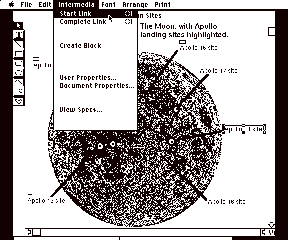
Fig.
1: The "Start Link" operation
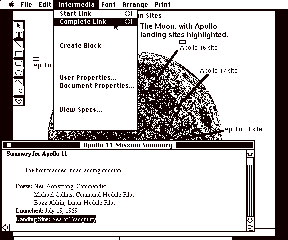
Fig.
2: The "Complete Link" operation
When the user finds an appropriate destination anchor for the link, he/she simply selects that anchor and issues the "Complete Link" command from the menu (See Fig. 2). This is analogous to selecting an item and choosing the "paste" command. When "Complete Link" is issued, a persistent tie is made from the anchor that is currently referenced in the linkboard to the anchor that the user just selected. This persistent tie will last eternally, unless a user explicitly deletes that link. Since links are bi-directional, a marker appears near the both source and destination anchors to indicate that a link exists and may be traversed. Following the link is as easy as selecting the link marker and issuing the "Follow" command from the menu (See Fig. 3). As a shortcut, the user can simply point at the link marker and "double-click" the mouse to traverse a link. The result of the follow operation is a traversal back to the other endpoint of the link, with that endpoint highlighted in gray (see Fig. 4).
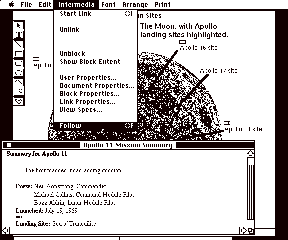
Fig. 3: The "Follow" operation
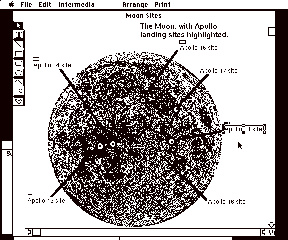
Fig. 4: Result of the "Follow" operation
Five years ago, with the exception of people at Xerox PARC and a few pioneers using Smalltalk and Lisp in research laboratories and academia, the paradigm of "cut, copy, and paste" was virtually unknown. Now, with the advent of the Lisa and Mac toolboxes, and more recently, of Microsoft Windows, that paradigm is a familiar one, even to five-year-olds using MacPaint. This paradigm caught on for four reasons: 1) powerful things could be done with this paradigm; 2) the paradigm was extremely easy to motivate and teach to end-users; 3) the toolbox vendors touted the copy and paste protocol as an important integrating factor that all software developers should include in their applications; and 4) most importantly, the toolbox supporters provided the framework for copy and paste deep in the system software and provided developers the protocols that enabled them to incorporate the paradigm into their software with relative ease. The paradigm is so widely-accepted that consumers regularly sneer at and ignore software that does not provide full cut, copy, and paste support.
Hypertext/hypermedia has the same potential for making fundamental improvements to people's daily work. Like "cut, copy, and paste," making and following links fulfills factors one and two above — it provides a powerful integrating ability and it is reasonably easy to motivate and teach to idea workers. Yet hypertext/hypermedia will only catch on as a fundamentally integrating paradigm when factors three and four can be fulfilled. Linking functionality must be incorporated, as a fundamental advance in application integration, into the heart of the standard computing toolboxes — the Macintosh desktop, Microsoft Windows, Presentation Manager, NextStep, etc. — and application developers must be provided with the tools that enable applications to "link up" in a standard manner. Only when the paradigm is positioned as an integrating factor for all third-party applications, and not as a special attribute of a limited few, will knowledge workers accept and integrate hypertext and hypermedia into their daily work process.
Warm linking
Warm linking builds on navigational linking to allow even additional levels of integration. Where navigational linkage allows the end user to simply follow from an anchor in one document to an anchor in another document, warm linking allows for the exchange of data over that link.
In particular, warm linking allows the user to simply issue the "Push" command and send the contents of the anchor in the current document over the link to replace the contents of the anchor in the destination document. Similarly, the user can issue the "Pull" command and replace the contents of the anchor in the current document with the anchor that is at the other end of the link. A master paragraph could be kept in a central document to which many others documents linked, and when it was updated, the owner could simply "Push" the update anchored paragraph to all of the other documents. Using the same mechanism that is needed for navigational links, we have added an additional level of integration.
As part of our IRIS's Interemdia project, we have a working prototype of warm linking functionality. An implementation document [Catl89b] by IRIS discusses this further.
Hot linking
Hot linking extends the level of integration even further by providing automatic synchronization of linked anchors. In hot linking, one anchor is specified as the "master" and the other anchor is specified as the "instance." Whenever the master anchor is modified, the updated anchor contents is sent over all links attached to the master anchor to replace the contents of the instance anchors at the other end.
Hot linking (also called hot views or live copy/paste) has been implemented on the Macintosh, in several integrated applications (single applications that support multiple data types, e.g. Lotus's Jazz), but not as a general purpose functionality between any two applications. In the Microsoft Windows and OS/2 environments, mechanism exists for applications to publish a live copy/paste protocol based on the DDE inter-application communications mechanism, but few applications have supported this functionality in general. Microsoft's newly announced OLE protocol, which runs on top of DDE, and Apple's previewed System 7.0 software are expected to provide some level of live copy/paste functionality on a broader scale.
What is important in this, and future versions of the desktop environment, is to make sure that there is a single mechanism that will handle navigational linking, warm linking, and hot linking, rather than having three individual, conflicting models. As well, there are other issues that any system supporting hot linking must address: Is it possible for users to break the link? If so, do users get a copy of the master in place of the instance, or do they end up with nothing where the instance used to be? Can the instances be edited, or are they just read-only views of the master? Or can the instances be edited, overriding the information from the master in just that instance? In some cases, the owner of the master doesn't want the instances to be changed at all (the budget shouldn't be changed by anyone but the owner). In other cases, the user wants to have a change in any copy to reflect all copies (change any copy of the logo from Esso to Exxon and have them all update without having to find the master).
Having the instances be editable requires some significant technology. If one pastes an instance of a spreadsheet into a word processing document, and then wants to modify the spreadsheet, the full functionality of the spreadsheet must either be available in the word processing application, or alternately, the system must support a component software/composite document architecture. The ramifications of this are discussed in more detail below.
An issues paper by IRIS [Catl89] discusses the detailed questions surrounding the topic of hot linking.
Active anchors in dynamic media
Many of today's applications — word processing, spreadsheets, and drawing editors — are passive applications. They typically present information to the user and remain static until the user requests a different view or makes a modification. Following links into documents from these passive applications requires simply opening the document, scrolling to the requested anchor point, and returning control to the user.
Yet many of the applications beginning to come into wider use today — animations, video clips, music playback, voice recording — are active applications. Here, when a link is followed into an document from an active application, there are many choices that must be made. Should I simply open the document but not run the action, essentially leaving the document open at the first frame, first bar of music, etc.? Or should their be some way of specifying a temporal span which is my anchor, so that following a link might run 30 frames of animation or 8 bars of music?
Papers by IRIS [PALA89, CATL88] address the action link question further.
Filtering/Querying
Given the basic hypermedia functionality above — supporting navigational, warm, and hot linking — it is important to look at giving users increased control over the link information that is viewed and edited, providing not only but browsing but information retrieval techniques in the multi-user hypermedia realm. Users should also be able to limit the links that are viewed, applying filters based on author, creation date, and modification date. Information retrieval techniques must be instituted so that users of a large, potentially unfamiliar hypermedia corpus can locate interesting and related information. We are looking at how the user, as well as the system, should assign attributes to anchors, links, and documents, and how a sophisticated query interface for such attributes should behave.
Constructing an effective query takes enough effort that if users are to use information retrieval, there needs to be a) easier-to-use interfaces for creating queries and b) system support for saving those queries. One of our fundamental beliefs is the queries of all types, both for hypermedia filtering and other information retrieval, must be represented and stored as concrete objects on the desktop. Queries must be made visible and manipulable to the users, not hidden away or created in modal dialog boxes, never to be seen again.
To make the stored query easy for the user to create, a standardized, graphical syntax for issuing queries must be developed. How much power should be provided to the user? Should the user have full boolean expression capability? Should there be the ability to have nested queries (like nested SELECTs in SQL)?
We have wrestled with these issues, and have developed what we call a token interface. Each token is an icon that when opened provides a property sheet that has all the attributes of the particular object for which it stands. The user fills in the token with values for those attributes. If a single token represents an entire query, the system looks for all objects that have values that match all the filled-in user values. If a user wants to do a nested query, the user can fill in an attribute with another token. For instance, to issue the query "find all documents created by nkm with anchors created by ny," the user would fill in a document token's createdBy: field with nkm and with the anchors: value with an anchor token. The anchor token, would in turn have its createdBy: attribute/value filled in with the value "ny."
This somewhat similar to the interfaces of Rabbit and of the Information/Object Lens system by Malone. But with the addition of tangible, movable tokens, we can go one step further, allowing users to compose boolean filters by arranging icons in horizontal or vertical compositions to simulate boolean OR and boolean AND, respectively. Essentially, the geometric layout of the the tokens is meant to conform to the physical notion of flow. Tokens aligned next to one another horizontally indicates that the information that will flow downward through them will pass through if they fulfill the criteria of any of the tokens in the horizontal stripe. The vertical composition will only let through information that passes through all of the tokens in the vertical stripe. By simply looking at the display, it is obvious to the user where s/he is widening or restricting the search (boolean OR or AND), without using boolean algebra.
An issues paper on this token interface covers this in greater detail. Besides filtering for hypermedia, we are also trying to meld the hypermedia "structure" search with full-content search to provide what appears to the user as a single search space. We discuss this further in the Access section below.
Virtual Links
A virtual link is different from other links because its destination point is not anchored to a precise selection in a document. Instead, the endpoint of a virtual link references some criteria, such as all of the documents that have the keyword "software avionics component." When a user follows a virtual link, the system searches for all of the documents that meet the criteria and presents the destinations in a list from which the user can choose. To specify the criteria, an author might define a desktop script or formulate a full-text or keyword search.
We are investigating how intelligent inferencing techniques could be used to find and suggest appropriate endpoints for virtual links. Endpoints should be ranked so that the ones that are more likely to be of interest to the user are set apart from the others, perhaps by placing them at the beginning of the list or via other user interface mechanisms. Each user might have a profile of rules that the inferencing engine could use to determine the ranking (e.g., the inferencing rules for aerospace engineers would place a higher ranking on information that met the criteria of a virtual link but also had a keyword of "aerospace"). Rules might also be constructed as a user browses through a web — the system could interpret the links that a user followed to determine what sorts of information s/he was most interested in and could construct rules accordingly. Because we believe that users will want to be able to view and modify their individual rule bases, we will need to design intuitive interfaces to allow this functionality.
While the functionality of virtual links and inferencing could be provided as a special feature of certain applications, we again see it as being an integral part of the standard desktop of tomorrow. Because hypermedia, by nature, is a flexible environment, authors are continuously adding to and modifying the information base. Ensuring that all of the related pieces of information are correctly linked to each other can become quite a challenge as the amount of information grows. By making virtual links available throughout the system, users will be better equipped to define links that will keep pace with a rapidly changing hypermedia environment. And inferencing techniques hold great promise for helping users to navigate through a large, changing body of information.
Component Software/Composite Documents
The current desktop environment encourages a model in which a single application operates upon a single data type. A word processor edits text, a graphics editor graphics, and a spreadsheet editor tables. As an acknowledgement of users desire to have documents that contain more than one data type, application implementors typically allow users to paste in static images of other data types (e.g. uneditable PICT graphics documents in Microsoft Word). Applications are islands, hooked together by tenuous bridges at best. Users can use interfaces like Multfinder to switch among a large number of applications, but this is awkward because windows tend to get completely hidden by other windows, and the resulting morass has none of the structure of the final document. Additionally, once the final document is created, there is no mechanism for retrieving the parts. If the user needs to edit portions of the document, difficult questions arise such as: What document is the original copy of this image in? What application was used to create it? If parts of the final document are copied by a user who lacks access to the original documents, the failings of this scheme become even more obvious.
Page layout systems tend to allow the editing of a small set of data types (typically several text formats and several graphics formats), but typically with their own extremely limited editors only good for touch-ups, rather than massive creation and editing. Not only are these editors often underpowered, but they have a different user interface than the one with which a user is normally familiar.
A letter to the editor, from a real user in a real computer magazine, states what users want rather eloquently [BRAI89]:
I have used the desktop metaphor in several incarnations - on the Macintosh, on the NeXT computer, and under Microsoft Windows. I think that the designers of these environments could significantly improve the genre by simply looking at their own real desktops and modeling their metaphors after the real thing.
I am most familiar with the Mac Desktop, so let me use it as an example. The way I use the Mac Desktop isn't anything like the way I use my real desktop. For example, I don't have a bunch of file folders on my desk - I keep them in a filing cabinet. On my desk is a pad of paper or a notebook. I can put anything I want on a piece of paper. On the Mac, however, everything is broken up into incompatible "documents" (i.e., spreadsheet, word processor, drawing, painting, and compiler documents are all completely incompatible and can be combined only in special cases).
With my real desktop, I might take a piece of paper and put some text on it with my writing tools. Then I might get out a set of drawing tools and draw on the same piece of paper. I can also jot quick notes in the margin. I might put a table of numbers on the paper and do math calculations on them using a math tool such as a calculator. I might have a book on the desk that I'm reading from as a reference while I'm writing. All the tools are out at the same time, and all of them are working on the same piece of paper. If I need more tools, I reach into a drawer and put those tools on the desktop, too....
All I want is an operating environment that I can draw and write on at the same time, just as I do on my real desktop.
What users want, and what we have begun to prototype, is a composite document model, where documents are composed of data of different types, each editable with the editor of the user's choice.
The component software system we are designing represents an evolutionary step in software user interface design. Powerful current user interface techniques will continue to be available. Multi-tasking, with multiple, overlapping windows will be supported. Cut, copy and paste commands will still be available for moving and duplicating data. All of these features will exist on a network of personal workstations where multiple users share access to a pool of documents. The documents may be linked to each other in hypermedia webs.
In talking about component software, we use the term editor to correspond to the present-day application program. Just as a user in a conventional system uses the MacDraw application to create a structured graphics document, a Component Software system user uses a MacDraw-like editor to create structured graphics within a document. An editor can be active, which means that it is loaded into memory and ready to be used; otherwise, it is inactive. This is analogous to an application, which may be running (active) or not running (inactive). The active editor that is currently in use is called the current editor. This is analogous to the Macintosh notion of a current application.
Chunks of data are manipulated and viewed in a rectangular (or perhaps polygonal) extent that we call a container. A document consists of one or more containers, each of which is associated with a particular editor. In general, a container can hold both data and other containers, and has one and only one editor associated with it. As an example, a document for a memo might consist of two containers, a text container for the text of the report and a structured graphics container for a diagram. If the author wants to add another diagram, then he or she would add another structured graphics container to the document.
Data will be stored in standard form(s) such that the user can choose which editors s/he prefers for each type of editing task. For instance, one user might set up a profile that says "for text format, use the Microsoft Word editor, for bitmap format, use the MacPaint editor, and for spreadsheet format use the Excel editor." When the user opens a composite document composed of these data types, these editors will be invoked on the corresponding data components. Another user might set up a profile that says "for text format, use the WriteNow editor, for bitmap format, use the SuperPaint editor, and for spreadsheet format, use the Wingz editor." When this user opens the same composite document as the other user, the same data components will appear, but they will be modifiable using different editors. We call these profiles editpacks or editor sets.
In our component software design, the storage system for the chunks of data that are viewed and manipulated in containers can vary. It can range from one chunk per file in a typical file system to one chunk per object in an object-oriented DBMS. Having the chunks stored separately, rather than all in a single data stream adds additional complexity. Given this architecture, I could have the same data appear in two different documents, merely by pointing to the same chunk. Even more interestingly, I might have one view of a set of data components as as an indented outline and another where I view these components as magazine article, with its complex, two-dimensional layout. Essentially, what are now applications that must have all sorts of mechanism for handling the creation and modification of content (page layout systems with their embedded text and graphics tools, outline editors with their embedded text and graphics tools, etc.) become editors whose main concern is not content, but how to manipulate, edit, and display containers that will be nested inside of it. One could now buy an outline editor that was capable of showing levels of detail, demoting and promoting nodes, etc., and choose the editors that one desired to create and manipulate the contents of nodes. This is can be an incredibly liberating technology if implemented correctly.
An end-user of a component software system will be able to create documents that incorporate a wide variety of media, all of which can be created and modified within the context of a single document. The user will be able to add new types of data and new editors in an arbitrary, flexible manner, just as the user can now add new applications to a computer operating system. The third-party developer is not shut out of the picture, but relieved of recreating a bunch of already existing editing functionality, and empowered to concentrate on the problem at hand.
As an aside, the label component software seems to be used to identify four related, but different concepts. Some use it as a synonym for a composite documents, where each data chunk is a component, and the data components are plugged together to make large documents. Others use it to identify a system in which a processing object (what Stepstone Inc. has called Software-ICs™) such as sorting algorithms or a compiler or a text editor could be replaced by another processing object that has the same program interface (much like one hardware IC could be replaced by another with the same behavior and pinouts). The third use of the component software moniker is the aggregation of the former two, where the component is a data/editor pair, such that each chunk of data carries around the editor(s) that can manipulate it. The fourth interpretation is a system in which the data chunks are stored as components in an object-oriented database management system. Thus the label component software, like hypermedia and object-oriented before it, has been rendered meaningless as a precise definition.
In fact, most systems are an aggregation of the various meanings. Our system design, for instance, actually comprises all of the definitions — we believe what is needed is composite document architecture in which the editors comply to a standard protocol and can be dynamically loaded in and out, where the necessary editors (or references thereto) are carried around with the data chunks, and in which the data chunks can be stored either in a file system or an object-oriented database.
Summary
Companies like Apple and Microsoft need to create, seamlessly woven into its desktop metaphor, the next levels of integration — persistent integration. They must provided persistent, hypermedia functionality deep in the system so that all third party applications can participate in a) navigational linking (following from one selection in document A to another selection in document B), b) warm linking (manual update of destination from source), c) inclusional ("hot") linking (the destination is updated every time the source is updated), d) action linking (the ability to invoke actions when a link is navigated, and maintain links to dynamic and temporal, rather than just static media), e) filtering and querying of the hypermedia structure, and f) virtual links (links with the destinations endpoints created in real time through querying and/or inferencing the data space.
To encourage such functionality, system vendors must provide a "linking protocol" that developers add to their applications much as they add "cut/copy/paste protocol," and a "linkboard," much the way they provide a "clipboard" for the storage of pending paste operations. As well, system vendors must provide a shared link database, since unlike cut/copy/paste, links are persistent and must a) be stored over time, and b) accessed by groups, not simply by individuals.
Finally, a component software architecture, allowing for composite documents and pluggability of editors, will provide a rather dramatic increase in user productivity and flexibility. The Apple Edition Manager and the Microsoft OLE Protocol are two important steps in this direction.
3.2.2 Aesthetics
The desktop of the future must conform to high visual aesthetics — presenting information to the user in a way that conforms to the highest graphic design ideals, and allowing users to present their information in the same manner. The desktop user must also continue to provide an operational aesthetics — maintaining consistency, reliability, familiarity, and direct-manipulability in operations on the desktop and within the applications that the system provides.
Visual Aesthetics
One of the most important techniques in turning data into information is presenting it to the reader in such a way that the meaning is readily apparent. With the exception of the teaching of English composition, individuals are simply not taught means for the effective translation of data to information of any type, whether it be pictorial, graphical, tabular, cartographic, or whatever. These skills are possessed by a rare few who are designers, graphmakers, mapmakers, etc., who have developed professional skills.
But if the computerized desktop is supposed to provide the means for individuals to turn their data into compelling information, and if most individuals do not have the design skills to do this themselves, then it must be the system itself that provides this crucial repertoire. How can this be done?
Visual style sheets. In the late 1970s, an independent surge in declarative, rather than procedural, specification for text formatting was sweeping the research community. Rather than have individuals explicitly designate the formatting procedures for each element in the document (skip 3 lines, change to 14pt bold Helvetica, etc.), the movement called for users to simply declare the type of a particular entity, and have that entity formatted based upon an entity-to-format mapping behind the scenes. Now, users could concentrate on the content and structure of their documents, and not on the formatting details.
This notion of style has not been strongly promoted in
today's desktop. Certain text applications, such as Microsoft Word, provide
basic style notions, but they typically are at a relatively coarse, paragraph
level. One needs finer-grained styles, that allow one to indicate indirectly
the formatting for imbedded titles, for figure numbers, emphasized words, etc.
As well, it is important to extend this style capability to other applications
— calendars, graphics, spreadsheets, page layout systems, etc. — so that users
can be more efficient by developing content, and not format. Imagine being able
to change your view of a linear schedule to a graphical calendar simply by
applying a different style sheet, or being able to change a tech report to a a
magazine article just by applying a different style sheet. This capability of
easily imposing different views — the Engelbart viewspec — needs to be
recaptured in the desktop of tomorrow.
Most importantly, the notion of styles must be a fundamental one in the system, because it needs low-level support to work properly. In particular, there needs to be support for style-sheet sharing, so groups of users can share the same formatting specifications. We believe that the styles should be stored in the same commonly accessible, shared database that the system will have for other desktop functionality (see Access below). There needs to be support for binding a document with its associated style sheet when it needs to be transferred to a remote system. There needs to be support for allowing users to override particular styles without having to make explicit copies of entire style sheets. The user interface to the management of group style sheets is a challenge, but will provide extensive user empowerment worthy of the mission.
One interface that may meet part of this challenge is that of computer-expedited markup, using inferencing, heuristic, and expert systems techniques to help the user tag appropriate entities. It is often easier for people to simply procedurally change the format of something (e.g., select a piece of text and change it to italics), then to actually think about what descriptive markup that entity should be tagged with. But if the system, after the user made a procedural change to some text, could pop-up with a menu of suggested tags for that element from which the user could choose, part of the cognitive difficulty of tags — categorizing rather than simply doing — would actually be handled by the system. Of course, users should be free to use procedural markup when they need to.
Such work has not yet been undertaken, but appears to be quite promising.
Operational Aesthetics
Operational style sheets.
Just as the style sheets of above provide a way to describe
a particular look without having to procedural indicate every formatting
action, systems of the future need to provide similar ways for users to
describe the specific way in which a particular task should be accomplished.
Too often, the user-level commands are just too low-level for the user to
easily accomplish the task at hand. A common, incredibly frustrating task is
one of creating mailing labels in a word processor. The process is typically
described in bits and pieces throughout a large manual, and consists of an
enormous number of steps — changing the margins, changing the number of
columns, altering the page setup, etc. What is need is an operational style
sheet in which a user can save the
procedures needed to perform a task under a single declarative name.
These operational style definitions may be active and built out of scripts (see below). Alternately, they may be instructional only, built with a combination of hypermedia, animation and scripting simply for the user to view the steps that must be taken.
More experimentation is needed in this area, but with system
support for visual styles, it seems important to use a consistent metaphor to
manage operational styles as well.
Document and Folder Templates.
One of the canons of the direct manipulation interface is that users should never be presented with a blank canvas if at all possible. Rather, the user's job should be one of taking an example of what they want, and refining it to be exactly what they desire, by changing both the content, and the form, if necessary.
On the Xerox Start and on the Lisa, this was partially solved by the notion of Stationery Pads. Opening an application provided a blank piece of application paper. But creating a document in that application, saving it as a stationery pad, and then opening the stationery pad essentially ripped off a piece of paper that contained a customized template.
Yet on the Macintosh, this canon was not followed, and templates could only be created through the laborious and idiosyncratic process of manually making copies of an existing template document (and trying hard not to overwrite the template document accidentally). Only recently have user interface guidelines suggested that applications add this capability, but since there is little mechanism in the toolbox to carry this out, this user interface policy has not seen widespread adoption.
Apple's System 7.0 and Microsoft's Windows reintroduces the Stationery pad metaphor for documents. Yet even this needs to be extended to be a more general function. Stationery pads allow a user to turn any document into an icon that represents, essentially, a new type of document. Double clicking on that object will create an instance of that new document type. But with the new multi-application world and multimedia world, often users want to instantiate documents together. This may be accomplished by allowing Folders to participate in the stationery pad mechanism. Now, I could turn a Folder into a folder pad so that when I click on the folder, I get instances of all the documents in that folder. Now, to create the appropriate documents for new employee, I would like to be able to click on a folder pad icon, and have the system create a new folder for that employee, with a payroll document, insurance form, biography template, health form, etc. And using system-supplied scripting functionality, I would like to have the new employees name and other vital statistics filled into those forms automatically.
The Stationery pad metaphor, extended to folders, and coupled with styles as described above, provide an important operational constant for the user.
Hypermedia Templates. Much of today's hypermedia literature mentions the problems of disorientation and being "lost in hyperspace." Better tools are needed to help authors organize a web so that they themselves and other users can better navigate and locate information within it.
One way to avoid this problem is to follow common styles in structuring certain classes of information. Such consistency helps readers to feel more comfortable browsing a web and to locate and access desired information. Stylistic guidelines benefit collaborators working on a new web—the authors are able to more easily see where the "holes" and other "trouble spots" are, thereby eliminating the potential problems of incomplete webs and even duplication of effort.
This will require not only document pads and folder pads, but web pads, which serve as templates that spawn a set of documents and folders that are pre-linked. Not only could each individual document contain template information, but there could also be a set of links between the documents, complete with suggested attributes and keywords. In the employee example above, the payroll, insurance, biography, and health documents would all be cross referenced at appropriate points, so users, for example, could easily navigate from the Blue Cross charge on the payroll record to the health form.
Web templates, however, do not need to be self-contained; users may want to design templates that provide links to and from existing documents. For example, a template for defining new engineering procedures within a company might need to provide links to all other related standards that have been published. Users who need to examine the related standards could follow these links, which will be "guaranteed" because they were specified ahead of time by the template author.
Work web templates at IRIS has been particularly
encouraging.
Infinite undo/Autosave/Checkpointing.
Using a computer for content development and editing should be a satisfying experience, one that is at least as tension-free as developing that same content on paper. Yet editing on computers has typically had a bit of Las Vegas associated with it. One should never play for more than one can lose; at anytime, the system may crash, destroying all modifications that the user has made since the last time the document was saved. Users of current systems quickly get into the habit of saving their documents frequently.
For years mainframe systems had "autosave" features. The systems still had explicit save commands, but the user could set an option that had the save command invoked every m minutes or every n commands issued. The notion of autosave should be another feature that is provided as a low-level system feature in the desktop of tomorrow.
At a finer level, even while the user is editing a document, systems that only provide a single-level of undo also provide a level of tension. Since the system only saves the last text that was cut, for instance, it is impossible to perform two cuts in a row and then determine that you didn't like those modifications and would like to return to the former state of the document — as soon as the second cut was done, the first information in the clipboard was removed. But this never happens with paper. If a user crosses items out, they can still find them and read them. Why should computer editing systems be less comfortable and more nerve-wracking to use?
They shouldn't. Rather than having single-level undo, all software running under the desktop of tomorrow must support "infinite undo," the capability of keeping a stack of the n last commands issued, and having the user undo them n levels back and redo them n levels forward. IRIS has incorporated this capability in its word, graphics, and table building blocks, and this simple user interface concept provides for a much more pleasant working environment. Users are now encouraged to experiment with the wording of a paragraph they don't like, knowing full well that if they don't like the changes, they know they can retrace their steps at any time.
The next step after this is to maintain the undo stack from
session to session. This is more difficult to implement, and more requirements
analysis must be done to determine if this feature would be commonly used by
the average user.
3.2.3 Perspective
Viewpoints
The desktop environment is represented today by the Finder. Revolutionary in its day, by providing concrete visual representations of more abstract notions such as files and folders, it provided millions with access to what was formerly hidden, complex information. Yet the finder essentially presents a single way of looking at information that is not always the most efficient way of viewing or traversing things.
By analogy, the Finder of today is used like the Yellow Pages are used outside of the Pacific Bell operating region. With the Yellow Pages, people have been ingrained to simply use the alphabetic headings at the top of the pages to zero in on their desired category. They flip through the book until the find "CA" and then look for "Car Repair." It is not there. The Yellow Pages don't have cross reference information, so the user is left to figure out what to do next. Categories in the Yellow Pages are like folders in the Finder. If you find the one you want, that's great. If you don't, what do you do next?
In the Smart Yellow Pages provided by Pacific Bell, the idea is to present the information in the book from multiple perspectives. Rather than try to find information only by looking at the categorizations, the Smart Yellow Pages provides a variety of different perspectives into the information. Maps, with references to points of interest in each zone allow a person to ask "what shops are nearby?" Listings of parks, with icons representing the facilities available, allow a person to ask "what park has horseback riding?" You don't have to look under museum, park, neighborhood, sightseeing, art, gallery, etc. to figure out what to do on a vacation day. Rather you can look at the "Places to Go" listing, which has pointers to entries from all of those categories. Have kids home on vacation? One can look at the "Fun for Kids" listing and find info on film, classes, activities, clubs, etc. New in town? Look at the "New in Town" section for a synopsis of all the places that you never normally can find because they are alphabetized under "State of California" rather than "California."
Next, the Smart Yellow pages provide a detailed, hierarchical structure that the user can traverse to get quick pointers into the alphabetic structure. One can start with "Food," go down to "Fruits and Vegetables" and finally arrive at "Olives," which points to page 1306 in the alphabetic section. Or one can start with "Food Service Industry," go down to "Food," and finally arrive at another entry for "Olives," which again points to page 1306. Importantly here, one can arrive at the same point by starting in many different places. This power of being able to approach a problem from the high-level viewpoint that you have and narrow it down to a result, while having someone else approach it from a different viewpoint and narrow it down to the same result, is fundamental to the desktop of tomorrow.
The Finder today provides the user with a single "world view" of his or her files: a hierarchy modelled by folders that open as windows, and contain files and other nested folders. The hierarchy is based strictly on the user building the tree on a file-by-file basis; this tree of named files is the only view of the documents the user is provided in the Finder. Though one can change the view locally, one folder at a time, getting a list view or iconic view, or sorting the documents based upon name, date, or type, one could not create global changes in perspective.
The Finder of the future must allow the user to shift viewpoints much like the user of the Smart Yellow pages. One might want a strict alphabetic listing of all the entities in the system (like the White Pages). One might want the hierarchical directory organization that exists now. One might want to have information organized user — give me all of Bern's info, then all of Nicole's info, then all of Tim's info. One might want the information organized by group. One might want the information organized by chronology — 1987, 1988, 1989 — and by subchronologies — by month, and then by date, and then by time. One might want it organized by data type — all the text components together, all the graphics components together, all the spreadsheet components together, etc.
And one might want any of several interfaces to any one of these organizations. The embedded folder view could actually be used to represent any of these hierarchies. A Smalltalk Browser is another potential view. The Smart Yellow pages itself has some interesting graphical designs for representing these hierarchies that might be appropriate for computer use. Others will probably invent even better methods over time. What is important is that the system be developed in such a way that any viewing mechanism can be imposed on top of the organizational perspective the user has chosen.
Such shifts in perspective are typically costly, either in
processing time or in storage for indices. While these problems have not been
totally solved, it is commonly believed that if such a system were based upon
object-oriented database technology, such shifts in perspective would become
easier. We are planning on experimenting with this in the near future.
Taskspaces
The current user environment provides a single "desktop" on which sit all items of importance. Even shared file systems are mapped into an individual's desktop, essentially making the base screen image of the desktop the one environment in which all data is viewed and manipulated.
Yet if the idea behind the desktop metaphor is to model the way that people work, it has become far too limiting. Neither individuals nor groups do all of their work on a single desk in a single room. Rather, often more than one person shares an office or room with others, either sequentially or simultaneously, and often even the work surfaces in the room are shared. An individual will use a desk in her study for writing her novel, the dining room table, with calculator and envelopes, for paying bills, and the kitchen counter, along with his or her spouse and a variety of foods and cooking utensils, for making dinner. The current desktop metaphor only lets the one user use one work surface for everything. The system needs to provide different perspectives of the work area, not just a single perspective on a single work surface.
The notion of using the metaphor of rooms and offices as a
way to "multiplex" the screen is not a new one. The Smalltalk-80
system provided the notion of "project." Each view of the desktop was
a "project." On any desktop, one could have icons for other projects.
Each time a user opened a new project, the screen state for the current project
was saved, the new project was entered, and its screen state was displayed. One
could have a mail project, a research project, a budget project, all of which
remembered all of the documents and the editors that were active last time the
project was entered. The Interlisp-D Rooms work was virtually identical, but
rather than using the notion of project, they used the architectural notion of
"room" as the metaphor for each project, and that of "door"
for an exit/entrance from one project into another. [Hend87]. Later work on
WYSIWIS rooms [Stef87] extended this to allow multiple people to share the same
room.
The desktop must be extended to allow individuals to have different "taskspaces" (individual desktops) for different tasks, and to allow these taskspaces to be private or public and accessible by one or many at a single time, based upon user preference.
A public taskspace would have a browser of the document space in the view desired by the owner of the taskspace. All users currently in the taskspace would be represented by user icons on the taskspace desktop. All tools that are needed to perform a particular task would be installed in the taskspace, so that users would not need to hunt around looking for appropriate applications to execute. Rather than having a massively cluttered desktop, in which documents from totally disjoint tasks share the screen real estate, individuals would have many taskspaces that they could enter, one at a time, having only the information they need. Users might have a mail taskspace where all the mail reading applications, address books, and archival storage folders would be readily available. A budget taskspace might have the memo tool, the spreadsheet application, and the budget documents for the last fiscal year. A proposal taskspace might have all of the applications necessary for writing the proposal, all the document drafts, the RFP, the note folder for comments, and would likely be a public, multi-user taskspace.
This view of the taskspace as a shared resource, and not an individual desktop, is powerful. Now, users working together are not just sharing files, but sharing whole environments and views into those environments.
Wayfinding
It is far too difficult, in today's desktop, to figure out what you have done, what your current state is, and what you can do next. The overlapping window metaphor, a boon for allowing for many windows to share rather limited screen real estate, is a bane by hiding out of sight information that indicates the full state of the desktop. On an actual desk, a user has a far more real estate than even on the largest typical computer screen. Human peripheral vision can perceive this large surface area, and therefore there are more visual cues as to active tasks and inactive tasks than on the computer desktop. On even the largest commonly available computer screen, the user's peripheral vision is not used to its capacity. As well, on an actual desk, the third dimension of depth — what is buried and what is on top — makes it easy to evaluate visually the state of the desktop.
To make up for the narrowness and flatness of the computer screen, the desktop of tomorrow needs to provide wayfinding cues and mechanisms that allow the user to reconstitute the information in the missing dimensions and area.
History. History is an important wayfinding technique. Because screen real estate is so limited, even on the largest screens, windows get buried. As well, individuals often put documents away that they want to retrieve again soon after without the time-consuming process of returning to the Finder's folder hierarchy and re-traversing the directory tree.
Some applications have created application-specific "Window" menus that allow a user to track all the open windows for a particular application. What is needed is an application-independent history feature that timestamps and keeps track of every document open, document close, document delete, window activate, and link follow operation from session to session, so that the user has a consistent interface to track and revisit documents and windows of interest. The history list is active, so that a user can click on an icon in the history list and have the document or anchor it refers to immediately activated. For the user to believe that the desktop continues to exist even when the system is shut off and turned on again, the system should keep track of information persistently, and therefore, the history list should persist from session to session.
We have implemented this facility in our Intermedia desktop environment, and it is met with great satisfaction by users. Even users very familiar with the standard desktop metaphor begin to rely on the history feature almost immediately, because it gives them a permanent record of information that they perused earlier and to which they may want to return. By making this history part of the standard desktop, operational coherence will be improved, users will be better able to find their way, and application developers will no longer have to support specialized tracking menus.
Trails, paths. Above, we advocate keeping track of a system history of document opens, closes, activates, follows, etc. If users were given the capability to edit and save such histories, they could create customized paths or trails through a body of material that would indicate a chain of interesting information to other users. The creator of a path would be able to name that path and have it represented as a standard desktop object.
With this capacity, a teacher could create path named "Novice" through the copier repair web, and provide it to all students, to take them through just the information they needed. The students would simply issue the "next" command to move to the next item in the path. By using the editable history interface described above, paths do not have to be developed as programmed scripts, but are created-by-example semantically as one does the traversal.
Bookmarks. Bookmarks have been used in a variety of systems to remember a particular location in a document to which the user later wants to refer. Above, we noted that notion of bookmark at an implementation level is equivalent to that of a hypermedia anchor. Considering this, a named bookmark at the user level is essentially a named path with one entry — an entry that opens up a particular document and scrolls to a particular spot in that document.
Maps. In an highly
integrated system that provides navigational links between documents, it is
important that the user be given indication of the relationships between
documents. Providing global maps of a web of documents is a particularly hard
problem, since the documents have no inherent topological information. But
providing local maps — where can I go from here? — is quite easy to do in
real-time and can provide important cues to the user who is trying to make
choices in a complex information space. By having a map that continually
updates with a new local view each time a user travels to a new document, the
system is anticipating the needs of the user. Local maps have been implemented
in our Intermedia prototyping environment and have proven to be of great use to
information navigators. A paper by Utting and Yankelovich [Utti89] describes
IRIS's design evolution in greater detail.
3.2.4 Access
Keyword/Attribute Value Searching
Above we discussed users desire to query system-supplied attributes assigned to hypermedia anchors, links, and documents, and to add user-defined attributes that can be queried as well. We believe the desktop of the future, should generalize this functionality, such that users could add attribute/value pairs to any system objects, and query those objects through the same user interface that was described above for hypermedia attributes.
With this functionality, users would be able to add their attribute/values to any object to aid in later queries. For example, the user could add the attribute/values "level: novice" or "level: expert" to all folder objects, such that later on the user could set up a filter that asked for only those folders that were at the novice level. Or a user could add the attribute/values "speed: fast," speed:medium," or "speed:slow" to all printer icons in the system and set up a filter that asked for only fast printers to be shown on the desktop. The ability for the user and not just some systems programmer to put attributes on any object and add values to those attributes will be extremely important in the future.
However, the attribute/value service should have a low-level API as well, so that the system can add attributes and values to objects for its own bookkeeping. For example, if one has a notebook computer that is docked with a desktop unit, and certain files are downloaded to take on a trip, the attribute "file status" on those notebook files might be assigned "downloaded copy." When the notebook was subsequently redocked, the system might look for all files with the status "downloaded copy," compare them to the version on the desktop unit, and ask the user for the appropriate action to take on each difference. Having the system use the exact same attribute/value service as the user allows there to be one generally useful mechanism, rather than two very special purpose ones.
Content Searching
We believe that content searching (most typified by full-text searching) is a fundamental requirement of users, and must go hand-in-hand with the structure-searching of anchors, links, and attributed objects described earlier. In particular, we believe that we need to create a single interface in which people can issue queries that both look at the keywords/attributes attached to objects in the system and look at the content of those objects as well. What people typically really want to know is "are there documents out there that have 'revolution' as its name, in its content, in the descriptors of any of its anchors or links, or in any of the keywords I might have attached to documents, anchors, or links?" The desktop of the future should strive to make sure that queries like this can be issued in one quick step, rather than through a string of idiosyncratic dialog boxes or boolean statements.
In terms of content-based searching, while many full-text retrieval DBMSs require that all of the textual data be stored in the database, we are interested in taking an alternate view. Specifically, the desktop of the future must provide general functions so that any document that contains text (not only text documents, but graphic documents, spreadsheets, etc.) "passes" the system all of its text when it is closed. The system then computes an index that is stored by the system, while the actual content of the document is stored as usual to disk. The user can issue a query to find all the documents containing a certain word or words, and the system can simply plow through the index, rather than the actual document content, to find the documents that contain matches. The system could use various techniques, ranging from signature files to btrees with fully-inverted indices. Signature files can be created on the fly and are compact, but lookup can be inefficient. Inverted indexes provide faster lookup, but take up significantly more space. Other new technologies claim to provide both space and lookup efficiency and real-time re-indexing, and their initial PC version appears to verify that claim. Assuring that the appropriate indexing technology is a deep part of the system is an important objective for the future.
Part of the success of content-based searching will be
achieved by having the system, proactively and behind the scenes, develop all
the necessary indices that are needed, so that when the user asks the question,
the system must not have to go through a painful, time-consuming search through
the entire storage medium, but can provide the answer almost instantly. This
notion of system anticipation will be
vitally important in the desktop of tomorrow.
One of our goals in the next desktop is to have tighter integration of tools. Typically, a thesaurus is seen as an end user tool used for writing. Yet if one has an online thesaurus server (see Services, below), one can start to do intelligent, anticipatory queries. If the user asks for all documents with the word "car" in them, the system can not only look for "car," but look for "auto, automobile, sedan, hatchback," etc. This doesn't require a sophisticated expert system; in fact, the thesaurus is the expert system. Given our existing thesaurus server, we are looking at how best to combine this functionality with querying.
Roget's thesaurus provides one taxonomy of works, but often individuals or groups would like to have their own thesaurus/controlled vocabulary for a database. Controlled vocabularies for database systems have typically been created as taxonomic hierarchies by professional indexers. At the best case, there is only one indexer, and he or she determines the appropriate taxonomy. With only one person controlling the taxonomy, at least one is assured that there are no duplicate entries or accidental duplications of synonymy. Yet even in this world, different indexers typically apply these categorizations to each article, bibliographic record, etc., and they fail to do it uniformly; the same article will not be indexed the same way by different indexers, so it can be assumed that different articles on the same topic will fare no better.
But when one talks about a networked environment, where databases are not basically read-only entities controlled by an administrator, but shared group works that can be updated interactively, how does one maintain a group taxonomy, and make sure that there is great consistency and little redundancy? And how does one allow for individual taxonomies separate from the group taxonomy, when you have a different view of what the taxonomy should be or you have something that you don't feel belongs in a shared taxonomy?
We have begun to look at these issues carefully, and will
continue to pursue them. To the first approximation, there has been little work
in shared authority lists in interactively-updated group databases. It is a
hard problem but one that deserves and needs a solution for the desktop of tomorrow
to truly be an effective shared resources.
Relational databases
Full relational databases, especially those accessed through network-wide server protocols, have recently become commercially desirable in the personal computer industry, with the announcement of CL/I protocols by Apple/Network Innovations, and the announced protocols/servers of Lotus, Microsoft, Ashton-Tate, Gupta, etc.
Protocols like CL/I provide an important system-level interface to heterogeneous database management systems that are under the SQL language. The next step is to provide standard user interfaces to CL/I, so that end users can issue commands in an easy manner without understanding the intricacies of SQL. There is no single appropriate interface, and it is clear that a number are needed depending upon the level of the user and the complexity of the queries that must be issued. What is important, however, is that all the user interfaces that are created support the notion of stored queries, so that after an appropriate query has been formulated and correct results are retrieved, that query can be stored as a desktop icon and the query can be issued again with merely the touch of a button. Too often database systems allow the users to store their answers and not their questions. The desktop of the future must support stored queries to relational databases as a standard feature.
Object–Oriented Databases
Relational databases appear to have become vogue just at the time when they are no longer particularly appropriate for modeling the non-linear data that today's graphic-based applications typically represent. The desktop of tomorrow must have an object-oriented database management system accessible at a variety of levels.
OODBMSs, however, have not yet reached high levels of commercialization, and are typically lacking in some important features. In particular, any OODBMS used in a desktop environment must support 1) multi-user access; 2) network access; 3) concurrency management; 4) simple installation; and 5) no need for a database administrator. Much work has been done on the theory and low-level implementation strategies of OODBMSs, but it is time to test out their validity by seeing how they fit into a desktop computing environment.
We foresee this fit at several levels of the system:
End-user. Malone's seminal work on the Information Lens and the Object Lens champions the use of message or object templates, defined as semi–structured collections of fields and field contents. In the Information Lens, message types could be defined in terms of other message types through an inheritance mechanism. Similarly, in the Object Lens, object types could be defined in terms of other object types. In each system, the user can create instances of object types, fill in the contents of the fields (or have the system fill them in based upon default values), create methods for object types, have computations performed based on the contents of the fields, and issue queries that traverse the lens space. Both systems include the important notion of agents, computation entities running "behind the scenes," attempting to fulfill constraints specified earlier by the user. Malone's vision is one of a "spreadsheet" analogue, a system so compelling in power of its combined structure, constraints, and computation that most user's work will be done within the Object Lens system.
Malone's viewpoint — that of an all encompassing system — is one of two choices that constantly must be made when new software is introduced. Is the new software simply one of many applications that the user has at hand in his or her environment, or does the new software replace all existing software and become the user's new base environment? In the past, editors like Emacs were touted as the environment in which all programmers should live. Some people can get by doing all of their daily work within Lotus 1-2-3. Hypertext and hypermedia systems typically create their own islands, rather than integrate with the environment in which they live, which has resulted, largely, in hypermedia systems being used as a supplement to daily work, rather than as a fundamental part of it.
It is quite unclear that a technology like the Object Lens, as compelling as it is, will replace a user interface model as prevalent as the desktop metaphor. Rather, the power of the Object Lens system must be incorporated, not as a replacement, but as an integral part of the desktop of tomorrow.
As part of the desktop, the system should provide lens-like functionality, allowing users, not programmers, to create hierarchies of object classes (fields and methods), subclasses of these classes, and to issue queries over these objects. Given this interface, users could have, built into the system, a kind of "hierarchical spreadsheet" in which they could create object types (similar to rows) with slots (cells) and methods (formulas) that operate on these cells. Yet the cells in a lens-type system could contain not just values or formulae, but pointers to other lens objects. If done properly, the user should be able to define an object type Computer, with slots SerialNumber, Location, and BoardList, where SerialNumber and Location are simple numeric and string values, but where BoardList is actually a list of Board objects. In today's spreadsheets and flat databases, this notion of hierarchy is only expressible through rows and rows of redundant data with only one unique cell per row. Since hierarchy is so important, the desktop of tomorrow should provide a user-level data storage and retrieval system that supports it. If done properly, the lens system and the scripting mechanism (see below) could be one and the same.
Desktop. As well as creating and manipulating their own objects and object types, users should be able to manipulate the standard desktop objects (folders, documents, applications) and what should be standard desktop objects (printers, fax machines, modems, users), in an lens-type fashion. In Object Lens, all data for an object appears in one of the object's slots. In an environment with extremely broad and complicated document/data types and desktop objects (3-d graphics, statistical data plots, printers, etc.), it is unreasonable to have to conform all of this data to fit into an all encompassing object paradigm. In an experiment we are undertaking, the desktop objects and document/data themselves would not reside in the lens system. Rather, "shadow objects" containing system-defined and user-defined attributes, would point to each desktop object. Users could create any number of fields and methods in defining these shadow objects. Some of these methods could get inside the actual objects to do textual pattern searching, statistical lookup, or whatever. But this access to the data itself, as opposed to the shadow's fields, would be done through a well-defined interface between the shadow and real object. The developer of the real object would need to provide the hooks for shadows to communicate with it.
In the current systems, each layer — the user interface, the language, the high-level operating system calls and data structures, and the low-level kernel calls and data structures — all present an entirely different set of interfaces and abstractions to the user.
Every user-based entity in the system has both system-defined and potentially user-defined attributes attached to it or to a shadow object in an object-oriented database. The user can thus issue queries concerning the state of just about anything in the system — mail messages, mailboxes, users, groups, processes, applications, stored documents, open documents, components, anchors, links, queries, taskspaces, folders, trashcans, printers, modems, fax machines,
Back-end data storage. If
object-oriented databases are to deliver what they promise, they must be able
to support the backend storage for data that are traditionally serviced by
relational or btree storage subsystems. Object-oriented databases should be
able to be the repository for dictionaries, thesauri, address books, telephone
directories, course catalogs, bibliographic systems, hypermedia webs, and the
like. An OODBMS that became part of a future system would have to be able to
support this functionality at appropriate performance levels.
Low-level program-oriented. Besides providing data storage mechanisms for data-rich services as above, OODBMSs should be able to provide a storage mechanism for editor/application developers that provides better support than a simple file system. Programmers should be able to simply issue a "store" method call on an object and have that object, and all of its related objects, stored into the OODBMS. By issuing the "retrieve" call, a programmer should be able to reconstitute this object and all of its parts, with little effort. By comparison, today a programmer has to painstakingly walk through all of an object's pointers and write out each individual part separately, and subsequently read in each object part separately and reconstitute them at the other end.
Going further, a highly-integrated OODBMS would allow a programmer to describe an object as persistent when it was first instantiated, and have the system keep that object in non-volatile storage until it is explicitly deleted. With this type of interface, the programmer wouldn't even need to worry about store and retrieve methods; the system would be retaining whatever objects the user had asked for with no additional work. This notion of persistent object store, if done correctly, could substantially ease the burden of programming.
Basis of the entire system. At some point, if object-oriented database management systems become fast enough, powerful enough, and easy enough to install and support as the lowest level of a commercial operating system, we expect it to take over the role of the file system of today. Our true goal is to have a totally object-oriented system, where everything in the system, from the lowest-level operating system data, to the highest level user-oriented entity, is represented as an object that could be stored persistently in an OODBMS. In particular, at the lowest level, the system might contain Application objects, User objects, Document objects, Process objects, Scheduler objects, all of which are live objects, and some of which might be stored persistently when the system was shut down. Users could use the same uniform query mechanisms to ask "what Applications are in the system? Which are active? What Processes are idle?" Rather than having such a distinction between user data/operations and system data/operations, the object-oriented database would provide a continuum of objects, from the most low-level to the most-high-level. In one sense, this is not unlike the Smalltalk or Lisp models. In another, though, we want to make sure that all of the appropriate entities of the system are not just representable as objects, but queryable through an easy-to-use lens-type user interface.
Summary. By having everything accessible through a common object-definition mechanism and common query mechanism, it becomes far easier for the user to master the system. We believe that an object-oriented database as the low-level technology, coupled with a lens-like user interface that is integrated with the system, rather than a replacement for the system, could provide these common mechanisms and make the desktop perform well not only through interactions, but through queries as well.
3.2.5 Service
Service-based Computing
Because of the single-tasking nature of the Macintosh operating system and of the early DOS/Windows, the stress of the original desktop was on an environment of applications and documents. Applications were essentially direct-manipulation editors that were used to manipulate data, and documents provided the mechanism for storing the results.
Yet a number of operations that users wanted to perform were not of the same class as these editors. Users wanted to look up a word in a dictionary, find a phone number, obtain a synonym, run a spelling corrector through some text, get a word count of a document, invoke a grammar corrector on a text, etc. These functions are not applications in the traditional sense. Rather, they are services, that can be used in conjunction with existing applications. More specifically, there appear to be lookup services, that provide a result based upon some selection that is passed to the lookup service (dictionary, telephone directory), and process services, which actually act upon the selection that is passed to them (spelling corrector, grammar corrector).
We foresee the need for the following services in the desktop of the future, and we have prototyped many of them:
Linking Services. As described above, the linking service provides low-level, multi-user access to a database that shares information about anchors and links imposed on a set of documents. When a user issues a menu command to create an anchor or a link, the application from which the command was issued actually calls the link service, through an appropriate interprocess communication mechanism, to record the creation of that anchor or link in the permanent shared database. Because linking is provided as a service, all applications can access it in a uniform way, and in fact a generic application framework can provide transparent anchor and link creation, even over a network.
Reference/Linguistic Services. These services exist in a very haphazard form in today's desktop. One can obtain online thesauri, online dictionaries, etc., but they typically fall short in one of two respects. Either they act as lookup or process services auxiliary to a particular application (e.g. the different spelling correctors in MacWrite, Microsoft Word, FullWrite, MacDraw, etc.), so the user must learn to use n different spelling correctors for n different applications, or they operate as standalone applications that cannot be accessed from within other applications (e.g. some online dictionaries and thesauri). Furthermore, the user-define exception lists cannot be used the different correctors.
What we want is a single server protocol for the different types of reference tools that exist in the system. One would have a single protocol for each reference tool, which would allow all applications to use a single program interface to that reference service. The desktop would provide the standard protocol (and perhaps a standard user interface as well), and the third-party dictionary provider would take their proprietary data and make sure it was compiled into a format that conformed to the protocol for that reference tool. We foresee the following reference tools:
• Dictionaries. The system should provide a standard program interface and a standard user interface to a dictionary. Importantly, however, the system cannot provide access merely to a single dictionary. Rather, each user has individual preferences about the dictionary they prefer. Some might want the Houghton–Mifflin American Heritage Dictionary, another might want the Merriam-Webster College Edition Dictionary, and a third might want the full Oxford English Dictionary. The system must provide support for having the dictionary of preference to be "plugged in" by the user. Our belief is that all of the dictionary support should be provided as a set of network-based services, so that there need be only one copy of any reference work per local area network.
As importantly, users often want to have a word looked up in more than one dictionary. To meet this requirement, we have begun designing the notion of a dictionary path. Using a dictionary path, the user would specify the dictionaries in which the user wanted to look up a word, the order in which they wanted the dictionaries accessed, and whether they wanted the lookup to terminate once a word was found or continue, finding all entries. Now, a user could look up the word "contract," and if s/he had specified the American Heritage Dictionary, Black's Law Dictionary, and Stedman's Medical Dictionary as the items and ordering of the dictionary path and requested continuation until completion, the system would return the 2 meanings for contract (noun and verb) from the AHD, the legal definition of contract (noun) from the law definition, and the medical definition of contract (verb) from the medical dictionary. One user action returns a wealth of information garnered from several sources.
Besides dictionaries available through publishers, end users would be particularly grateful for what we call a dictionary builder, a facility that allow users to create their own glossaries and dictionaries that comply to the same protocols and interfaces as the published dictionaries, including multi-user and network access. With the dictionary builder, users would be provided with an easy to use interface that allows them to enter a head word (key), and a corresponding entry for that head word. In more sophisticated versions, the user would be able to break down the entry into subfields (part of speech, etymology, etc.). When the use was finished adding entries (this could be done at any time), the new entries would be automatically "compiled" and added to the network accessible dictionary. Now teams working together can create their own glossaries of terminology, dictionaries of acronyms, and other special purpose correspondences that can be retrieved at the touch of a button. Never again will the reader of a military spec have to puzzle over each page for minutes trying to expand all of the alphabet-soup of acronyms. This facility — allowing people to create private stores of information that are fully integrated with the published works — is of extreme importance in the future.
• Thesauri. Much like the dictionary, a thesaurus service and a thesaurus builder should be built directly into the system.
• Morphological derivation services. Part of any good dictionary or thesaurus lookup protocol is morphological derivation — the substitution of a chosen word with its plurals, its different parts of speech, and all of its valid forms with prefixes and suffixes. Too often, in using databases, text searching engines, pattern search facilities in text editors, and the like, the user won't find all corresponding entries because the system isn't smart enough to search for morphological derivatives. For example, the system may not find news articles about organized crime if you simply ask for stories with the keyword "mob," because the system will not locate any references to "mobster." With a morphological derivation service, such as the one that IRIS has developed for its InterLex dictionary user interface, this would be taken care of, since the production rule allowing the "ster" prefix to "mob" would be part of the rule base. The appropriate morphological derivation service would be accessible, network-wide, to any application that wanted to expand a single word to all of its potential derivatives, allowing for the type of "intelligence" that most people would like a computer system to exhibit.
A paper by IRIS's Jim Coombs address the morphological analysis problem in detail [Coom89].
• Spelling correctors. Spelling correctors have been one of the most used components of word processing systems, since they provide a functionality that is not easily duplicated manually. Yet the spelling correctors that exist today each are customized to a single, particular application. Each spelling corrector for each application has a different interface to accomplish the same job. In the desktop of tomorrow, there needs to be a spelling correction service protocol a) that allows all spelling correctors to conform to a standard program interface, and b) that provides a standard interface of which all spelling correction services would be encouraged to partake so that the user is presented with a common interface for spelling correction, regardless of the application and regardless of the manufacturer of the spelling corrector.
• Grammar corrector. Much like the spelling corrector, the grammar corrector should be built as a service with a standard grammar correction protocol and standard grammar correction user interface.
• Pattern search (find) services. One of the most used interfaces in a variety of applications is that of textual pattern search. Here again, each vendor must reinvent regular expression searching and pattern searching user interface, and the user is bombarded with n interfaces for 1 conceptual operation. With the selection manipulation protocol (defined below), it becomes possible to have one system-wide regular expression service and one system-wide textual pattern matching service with one system-wide user interface across all applications.
Directory Services. Directories of addresses, telephone numbers, electronic mail addresses, parts numbers, etc., are extremely common. In today's desktop environment, there are literally hundreds of different minor applications that provide directory services for a limited domain.
In the future, there needs to be some common, network-wide service, with a common user interface, that allows end-users to create and maintain a set of directories with standard user and system interfaces. Part of the standard user interface should be a way to use the current selection in any document as the parameter to the service; e.g. one should be able to select a proper name and issue the "Telephone" command and have the number retrieved (and perhaps dialed automatically).
Selection Manipulator, Tokenizer. Accessing selections in documents is fundamental to most of the above described services. This section describes how to systematize that access.
Selections, to the user, are one of the most fundamental parts of the user interface. But the low-level parts of the system pay little heed to this. In both the Macintosh toolbox and MacApp, there is no direct notion of the selection as a first class object. This must change.
Once this does change, and the notion of selection is made consistent across applications, one can introduce a selection manipulator class that provides a selection manipulation protocol. By this we mean a generalized way in which the selection in an application data structure can be moved, expanded, contracted, extended, and replaced by some service with the service knowing nothing about the format of the data structure. In particular, a selection manipulation protocol allows operations like "set selection at beginning," "set selection at end," "move selection to next character/token/element," "return the contents of the selection as text," "replace the selection with this." For each selection manipulator subclass, there is typically a subclass of class tokenizer, which understands how to look at the data stream on which the selection manipulator has a handle, and parse it to return appropriate chunks (next word, next sentence, etc.).
Each application developer would have to implement a subclass of the selection manipulator that mapped the generic commands to the specific application data structure. But once this was done, system services like spelling correctors would only need to be written once. Regardless of whether one was implementing Microsoft Word or MacWrite, if they each had the appropriate selection manipulator, the same spelling corrector, which issued generic selection manipulation commands like "next word, previous word, replace selection with this" would run with both word processors with no change whatsoever. A sophisticated selection manipulator should be able to stream through graphic objects as well as text, and actually stream through data types embedded in other data types. IRIS has implemented such as selection manipulation class, and has used it quite successfully to build a spelling corrector that knows absolutely nothing about the data structure on which it works.
The selection manipulator is the technology that allows selections to be used not only "within" individual applications, but by a common desktop interface that can communicate with all selections. Given this, the desktop could provide a set of generic functions that operate on any selection, regardless of what application/editor it happens to be in. These functions could include a calculate function that will perform computations on simple mathematical expressions that are in a character stream. An execute function might execute as a script the characters in a selection. A dial function might call out on the telephone using the numbers that are in a selection. As explained above, a lookup function might access the dictionary or thesaurus. Other functions, not yet defined, will be of some use in the future, so the mechanism of processing the selection as a parameter should be extensible.
Information Services. Additional
information services that users have begun to call for are access to online
catalogs, bibliographic services, and online databases (medical and legal), and
online information feeds, such as the Associated Press and BusinessWire. Access
to these external sources is beyond the scope of this draft, but developing a
consistent interface to these is of high priority in taming the desktop.
Server Building Block
Most of the above services have been implemented by various software vendors, but each of them in a rather ad hoc fashion, typically using very non-general methods of interfacing to the client application. In the new desktop, the notion of a Service must be made a standard, generalized concept of the environment. The system must provide an object-oriented Server Building Block from which all new servers can be developed. This building block provides a standard notion of client and server, and a standard abstraction of writing to the server and reading from the server with the transport mechanism (interprocess communication), hidden from the developer of the service. If each service developer has to become a IPC or networking expert, it severely reduces the number of services that will be produced. A server building block hides these details and allows a service provider to concentrate on content.
Most recently, IRIS has developed RPC++, a C++ version of the Unix-standard RPC (remote procedure call) protocol. Using RPC++, one simply invokes methods on what appears to be a locally-allocated object, but actually makes calls to and operates upon methods of an object that resides in an entirely different address space across a local or wide-area network. Importantly, to create such client/server relationships, the developers need know almost nothing about networking; the RPC++ protocol masks all of this detail for them, including the sending of objects across the network.
3.2.6 Community
Access Rights/Users/Groups. The original Macintosh/DOS desktops had no provision for noting the ownership of files, folders, and other resources by different individuals or groups, nor did it have any provision for systematically maintaining an understanding of the current user to provide access to protected services such as electronic mail, databases, printers, etc. Even though more than one individual might use the same machine (in different shifts, for instance), all material, no matter how confidential, was available to all users.
The AppleShare File Server, and the companion upgrade to the Finder to support shared, transparent access to a file system, added access rights and groups, but only for shared file systems! Rather than have access rights, users, and groups become a fundamental part of the entire operating environment, they were used only for the special case of remote file volumes. Locally, still, there were no access rights on documents or folders. With electronic mail, even though the file access users and groups are typically available, the mail system defines its own version of users and groups. When one installs a multi-user database system, one defines yet another set of users and groups. The multi-user notion of the desktop comes accross as an afterthought.
Part of the transition to the desktop of tomorrow will occur by extending the vision from one of a single individual with his or her single desktop, to one of a community with multiple desktops that reflect both individual and cooperative tasks.
This requires that users and groups be fundamental notions
in the system. Users and groups should be represented as direct manipulation
icons on the desktop, most explicitly on the part of the desktop that
represents the shared file server on the network over which the user and group
names should preside. User icons could be represented visually either with a
common design for all users, or more concretely as a common design coupled
with a scanned image of the user's face. Groups could be represented as a
special class of folder that contained user icons or other icons representing
embedded groups.
User icons and group icons would each open up into a property sheet that enabled one to view and/or edit any of the properties of the user or group: name, address, telephone number, membership, etc. Rather than have very specialized system administration interfaces, users and groups would be manipulated as standard desktop objects.
One of the properties associated with users and groups would be a profile. This profile would be also be directly manipulable and represented as an icon, and would allow each user to customize his or her view of the system when they signed in. The profile might set the appropriate perspectives for the finder, start up desired editors, run some scripts, retrieve some mail, etc. Because the profile is on the network server (if this isn't a standalone installation), a user can sign in on any machine on the network and receive the exact settings that would be needed.
Making users and groups into first class objects is an important addition to the desktop of tomorrow.
Group Annotation
Networked desktop environments such as IRIS's Intermedia system, provide a number of features that make them suitable for collaborative work and the joint exploration of ideas. In IRIS's Groupware project, our goal is to create experimental tools within our existing desktop/hypermedia environment to enhance group interaction, joint authorship, idea sharing and communication within the context of a group's work.
Currently, annotative collaboration is supported by users linking a new document to an existing one using the Intermedia linking functionality. Although this procedure may be cumbersome—a user must make a selection in the existing document, choose the "Start Link" command, open a new document from the "New" application window, enter the commentary, select a portion of the commentary and choose the "Complete Link" command—it does have some benefits. The annotator may choose from any of the available applications to enter the commentary, using text, graphics, timelines, etc. to make the desired point. He or she also has the ability to copy all or a part of the existing document into the new one in order to modify it. The author of the original document can later decide to replace his or her original material with the suggested revision using copy and paste. The system supports this sort of annotation by providing annotate permission to documents in addition to read and write permissions. An author can therefore protect a document from editing while still allowing certain groups of users to make links to or from the document.
While the functions that do exist are useful, they fall short of providing an integrated set of tools that simplify and help to manage the complexities involved in working in groups. For example, there is no way to notify co-authors that a document has been updated or to indicate what changes have been made since the last version. The annotation tools are cumbersome, requiring many steps to accomplish what should be a quick task, and they do not provide tools to help authors merge annotations from different reviewers, keep track of the status of annotations and easily delete the ones that are no longer relevant. In addition, the system provides no mechanisms for organizing and discussing a collaborative effort.
One of our general requirements is to design a general purpose annotation facility. The method for creating and viewing annotations should be identical across all applications, not just textual applications, which is the current state-of-the-art. From this it also follows that users should be able to create annotations of any document type. For example, an annotator should be able to suggest revisions on a graphics document using graphics editing tools. We recognize, however, that regardless of the type of document being annotated, users will want to add commentary. The annotation functionality must therefore provide a set of text-editing capabilities with which to compose notes, comments, questions and suggestions. These textual annotations should be able to stand alone or accompany annotations created with other editing tools.
We also recognize that different styles of annotation interfaces might be more appropriate for different types of annotation tasks. For example, text in a separate window might be best for a two- or three-paragraph comment, while drawing lines and arrows directly onto the document might be best for suggesting revisions to an architectural drawing. The author or the annotator should be able to switch between the different interfaces with ease and with no loss of information. Regardless of which interface the user chooses, either to create the annotations or to view them, it should be possible to see the substance of an annotation along with the part of a document to which the annotation refers.
Because users should be able to switch between the different interfaces with ease and with no loss of information, a "Common Annotation Format " must be developed to represent annotations in an interface-independent way if we are going to support multiple interfaces.
There should be a simple way for an author to incorporate a suggested change, such as a sentence rewording or spelling correction. This mechanism should be faster and more direct than using the copy and paste commands. The system should allow the author to keep track of which annotations have been incorporated.
IRIS has developed protoypes that attempt to use existing hypermedia anchor and link services as the basis for a Post-It™ style interface and an acetate overlay inteface for annotation. Using anchors to keep all annotation marks current, even if a document is updated, is an important step, but there are some difficult problems in critiquing online documents that will become markedly easier to solve with the introduction of handwriting and gesture recognition technologies.
Voice Annotation
A next level of annotation, and one that has great promise for the desktop of tomorrow, is voice annotation. Just as we now allow annotation links from anchor points in any document to a Note document that contains a medium-specific pane and a textual commentary pane, one can extend this notion to a Note window that contains not merely a textual pane, but a voice pane as well. Now to create an annotation, one simply choose the "Create Annotation" command, a new Note window pops up, the user hits the "Record" button (or perhaps recording is voice activated) to start the recording of the annotation, and hits the "Stop" button to finish the annotation. The person viewing annotations on a document can simply follow the annotation link and have the voice recording played back automatically.
As mentioned above, it is vitally important to have both a
low-level voice recording and playback building block deep in the next
generation system and a higher-level
building block that provides a standardized user interface to recording and
playing back voice.
Conferencing
Conferencing is another community technology that will be come increasingly important. Currently, most conferencing systems are special-purpose islands, in which the user types or imports ASCII text (and an occasional picture) and essentially "mails it" to a particular "topic" in the conferencing system. These conferencing systems typically have totally different browsing techniques than the standard desktop Finder, even though they are essentially keeping track of a hierarchical set of topics (each conference topic can be thought of as a Folder containing postings or sub-folders with sub-topics).
One of the most typical attributes of conferencing messages are references to previous messages, but most conferencing systems provide only rudimentary support for creating online links to those messages. More often then not, the commentors typically copy the relevant part of the message into their message, or simply give a message number with which all readers can, in some form, track down the original message.
In the future, conferencing should be much more integrated into the desktop environment. At any point, a user should be able to create a conferencing folder, a direct subclass of a normal folder. The default view of that folder will be a chronological view sorted by time and date. In that folder, any user can create a new document of any type, that when saved, will have all access rights for further editing disabled, and will now be viewable by anyone else with access to that folder. Anyone can create annotations to that document by using the annotation facility described above. Users can create new messages but refer to old messages by creating explicit links to those messages. Like those in a note folder in annotations, entries in a conference folder would have additional fields — number of annotations, number of references in, number of references out, etc. — that would make it easier to understand the state of the particular conference.
Rather than inventing entirely new applications to support conferencing, it is important that the desktop of the future use small modifications of existing interfaces — folder, linking, and annotation — coupled with existing document types, to have conferencing be a general, desktop functionality, not a specialized, isolated island.
Shared editing
To really encourage community, the desktop of the future
must provide built-in support for shared, synchronous editing.
A paper by IRIS [Fitz89] on object-oriented database techniques for implementing shared synchronous text editing discusses this effort in greater detail.
Miscellaneous
Other "community" requirements that will be discussed in future drafts include integrated multimedia messaging, integrated telephony, and integrated Mail.
3.2.7 Adaptation
Scripting
One of the reasons that HyperCard is so popular is that the user can customize things and can do some programming of repetitive or desired actions.
Yet current Macintosh and Windows finders are largely non-customizable and non-programmable. The user cannot write scripts to open documents, or to run utilities on documents (count the words, find all the documents with a particular pattern, etc.). Certain keystroke macro packages allow very cursory scripting based upon lexical input, but there lacks higher-level semantic scripting that allows the user to identify desktop objects (documents, folders, windows, trashcans, etc.) and operate upon them (newDoc = Desktop openDocument: "1988 Budget"; newDoc scrollTo: R1C4). This is noticed by users, who are used to being able to say "go to new card; go to stack "Budget Stack", etc.). Essentially, the Finder must be implemented in an object-oriented fashion so that it is extensible and customizable by programmers, and the major object types must be accessible to end-users for query and scripting.
The desktop must be opened up to be customizable and programmable. A Finder should allow individuals to write scripts that 1) manipulate Finder functions, 2) allow the user to interactively manipulate, customize, and iterate over desktop objects (documents, folders, icons, windows, etc.) in complex ways, and 3) potentially operate upon objects "inside of applications." Applications should be able to register objects that are manipulable in this way as well. Models for object-oriented storage and for compound document architectures are important fallouts of this process (see above).
We have begun to design and develop a desktop interface to the language-independent object-oriented generic scripting framework. Like a generic application framework, the generic scripting framework provides a working scripting interpreter and default syntax that developers can use or subclass for their internal scripting needs. The interface follows two basic rules: the user can attempt to "execute" anything that they can select in a document, and the user can attach scripts to objects that they can select. Scripts can be developed using any of the existing editors, and all of the navigational linking features of the underlying hypertext engine are available to script authors. Although the bytecode interpreter is language-independent, we have currently implemented support for only one language —Smalltalk.
There should be a way for applications, especially those adhering to object-oriented techniques, to register objects and methods that can be queried and possibly even manipulated by the desktop scripting language. Our InterScript work has developed a low-level interface in which objects can actually be shared between the scripting run-time environment and the application run-time environment.
Caveats. Desktop
scripting can't and shouldn't be a crutch for bad design. Users should be able
to write scripts if they want to,
but shouldn't have to write
scripts to get most activities done. Scripts should reserved for doing complex
and special-purpose things.
Scripting shouldn't be limited to one language. Our InterScript work has developed an interface in which a low-level object-oriented bytecode interpreter can support a large class of textual or graphical object-oriented languages, by subclassing classes in the generic scripting framework. Since routines in these different scripting languages compile down into the same bytecodes, one can mix and match scripts from different languages.
Several IRIS papers discuss the scripting question in far greater detail. [Gran89, Catl89].
Information Envoys.
Information envoys, software "servants" that are continually looking out for information to satisfy conditions imposed by their "master," have been a much-talked-about feature of future computing environments, yet have been little-implemented in practice. In our proposed research, we plan to develop envoys that provide the user with an interface for specifying missions within interconnected, decentralized information networks. Envoys will use operatives to carry out missions and will use informers to notify users of the outcomes of missions. The operatives and informers will not be newly created, but will be formed by taking existing applications and having them adhere to an interprocess agent/operative protocol. In the environment we envision for the future, envoys and not users will bear the primary burden of finding out about information and people on the network. This shift in collaborative communication will substantially reduce the user’s effort associated with communicating information and coordinating activities. A prototype of this functionality, with the slogan "we don't want users to have to find information, we want information to find the users" has been built by IRIS within the Unix/Motif environment.
4. Underlying Architecture
4.1 Software
A separate paper will
describe the architecture of our proposed desktop in more detail, and provide a
user-level scenario. Here, using the diagram as the basis, we offer a brief
summary of the layering.
|
Envoy interface |
|
User-level scripting |
|
Rooms/Offices/Workspaces/Tasktops |
|
Finder-like Perspectives |
|
Uniform query interface
(content, structure, and attribute) |
|
User-level object
creation and subclassing, attribute and value assignment |
|
User-level composite
documents |
|
User-level components |
|
Hypermedia Services |
|
Services (Directory,
Lookup, Process) |
|
Selection Manipulation
Protocol
Envoy/Operative/Informer Protocol |
|
OO Building
Blocks/Components |
|
OO Toolbox/Application
Framework |
|
Databases (Relational,
OODB) |
|
OO Browser/Debugger |
|
OO Operating System
(Multitasking, Virtual Memory, IPC, dynamic loading) |
|
OO Language |
|
Low-level bytecode
interpreter |
|
Microprocessor/RISC chip |
4.2 Hardware
A detailed set of hardware requirements will follow in a future draft of this paper. In the mean-time, the following are brief descriptions of major areas that have not been addressed in any mainstream commercial product as of yet:
1) Higher screen resolution. 150 DPI displays need to become the norm in the next 2 to 3 years. While these may not yet be financially viable, it is important to start catalyzing the process of really stretching screen resolution, especially now with the push towards outline screen fonts generated on the fly. The current 75 DPI screen fonts just aren't crisp enough for long sessions of careful reading, and are barely passable for attractive on-screen design. As the desktop becomes not just a medium for creating paper, but a medium for creating electronic documents and information bases, the system must support higher and higher quality graphic design. The first step is higher resolution, to have crisper text at smaller point sizes.
2) Higher-bandwidth network. A breakthrough is needed here, especially in having the
higher bandwidth across great distances.
3) Video in a window. If video is to be the next medium of the masses, it needs to be fully integrated into the desktop. This requires video signals in a window that is moveable, scaleable, and resizeable. This should be fundamental to all systems, with even the potential consideration of supplying a television tuner with all systems.
4) Real voice recording and playback support. If voice is ever going to catch on, it too needs to be fully integrated at the desktop. There needs to be voice analog to digital conversion and compression/ decompression mechanisms in the hardware platform, an object-oriented voice building block that provides both the mechanism and user interface policy for voice storage and retrieval, and a standard-user interface that allows voice to be created and edited in the same way from anywhere in the system.
5) Ubiquitous mass storage archival and transmittal medium. Even though the industry is now pushing desktop media, it has no coherent plan for the backup, and more importantly, the transfer of large amounts of information between individuals. Floppy disks, even at 1.4 Mb per, are inappropriate for transfer of the hundreds of megabytes of data that multimedia systems imply. The two future choices are either 1) removable magneto-optical or writeable CD-ROM storage on every product shipped, or short of that 2) a 8mm videotape recorder on every product shipped that could be used both to provide backup capability (2 gigabytes per tape at about 10 MBytes per minute throughput) and to provide video recording/playback capability. Without providing a standard high-capacity, ubiquitous exchange mechanism — the 1990s equivalent of the 3 1/2" diskette — the community will be fractured into inaccessible islands with unfortunate borders.
6) Melding of portables and workstations. The information on the desktop must be made portable. Users need some way of easily taking with them the information on which they survive daily. In today's current environments, users must 1) copy that information explicitly to a floppy disk (or a myriad of floppy disks) and recopy them to a hard disk at the destination; 2) unhook a hard disk that they carry with them, and then hook up the myriad of wires with appropriate SCSCI connections at the other end; or 3) use expensive telecommunications equipment to "log in" to their workstations, which is reasonably difficult with a graphics-based, rather than keystroke-based interface. What is clearly needed is a way that the user can easily take an operational portable with him/her in a flash, and when returning, "dock" it to the "mothership" and have a desktop workstation, with a large screen, network connection etc. This model of a docking workstation is vitally important. The desktop of the future must be a portable desktop, not only a stationary one.
7) Handwriting and gesture recognition. Handwriting and gesture recognition is beginning to get a big play in the press, and will increase in important as the decade progresses. While handwriting recognition is what appears to be most intriguing at first, it will likely be gesture recognition — recognizing document markup, graphical sketching — and the more limited character recognition for forms and spreadsheet filling — that will validated this technology.
5. Conclusions
5.1 The "Line of Accommodation"
The original desktop interfaces were successful because by learning a reasonably small number of concepts, users were empowered to use the entire system. By learning to use the mouse to point, click, drag, and select, by learning to use menus, by learning to use scroll bars, by learning to manipulate windows, and by learning to manipulate icons, the users learned enough to feel extremely comfortable with, and use, a large percentage of the available functionality in the system.
Yet the Macintosh seven years later, for instance, has so many additional features, many only loosely knit into the fabric of the system, that users have trouble learning how the system operates. For example, major functional changes to the network configuraton are made by using the Chooser. Rather than being desktop elements, that maintain a visual presence with the user and stand for something, the network elements are hidden away in the bowels of the desk accessory menu, like television controls used to be before the Japanese moved them up front years ago. Why aren't these icons simply icons on the desktop, that when clicked, open up to provide their appropriate interface, like other documents? If I want to open several file servers, why can't I open a file server folder somewhere in the system that contains icons of all the potential servers, and open the ones that I desire? Why is the network such a second class citizen?
In general, users want increasing functionality, but they would prefer to have it delivered within the conceptual framework they already understand. There appears to be, as IRIS's Paul Kahn has termed it, a line of accommodation past which users will not cross. They will learn new applications of a particular concept, but rebel at learning entirely new user interface concepts unless they are vitally important to future work. Currently, users' minds are cluttered trying to remember ad hoc user interface additions that were not designed holistically, but were developed outside of the context of the rest of the system. When new user interfaces for wholly new functionality are needed, they should be supported and encouraged, but they must be within the line of accommodation, so users will take the time to learn them. The desktop of tomorrow must strive to have its basic themes fit within a small user interface conceptual framework that user's can continue to accommodate.
5.2 Policy AND Mechanism
The success of the Macintosh interface and of Microsoft's Windows 3.0, is largely a triumph of a fast toolbox mechanism that allowed for the creation of a crisp user interface coupled with a well-thought out user interface policy that enforces (by convention and/or intimidation) a consistent look across a variety of applications. Apple and Microsoft have succeeded largely because the user interface model and vision drove the technology.
The Unix world has not really figured this out. Their adoption of X Windows, whose motto is "we provide mechanism and not policy," provides a standard low-level environment where chaos can reign, since each vendor now must provide its own high-level policy. (This is an exaggeration — there will probably only be half a dozen standard X user interface packages!) Sun and AT & T have provided a standard user interface policy but no standard mechanism with their OpenLook package. Each companies software will look the same to the user, but must be implemented using totally different techniques on each vendor's platform. It is only when policy is coupled with mechanism that a lasting marriage is wrought.
Apple's toolbox was also successful because it was driven by a larger vision — the creation of the Lisa Desktop environment (later called Lisa 7/7), in which seven applications (word processing, structured graphics editing, bitmap editing, project management, database management, terminal emulation, and spreadsheet management) were designed to be highly integrated into an environment where they coexisted simultaneously, along with the Lisa Finder. Lisa failed, for a variety of reasons (too high a hardware price, too slow an operating system to support the toolbox, and too few third party applications). But it still shines as a beacon of a well–designed, well-thought out system, providing a familiar and coherent framework with which users could become intimately familiar.
Just as Apple upped the ante 6 years ago by providing mechanism and policy far more sophisticated than any other subroutine libraries/applications of the day, so must the system vendors of the 1990s begin to provide building blocks/components that provide the sophisticated functionality of the best applications of today. The desktop of tomorrow must be designed not with the goal of allowing developers to make technology that stands alone, but rather with allowing developers to make technology that works together and conforms to an improved user interface policy.
5.3 Hyphen-based Euphoria
As we have seen above, building the system of the future is not a matter of simply finding a "silver bullet" technology that replaces the desktop metaphor and solves all problems. Yet all too often, industry falls ill to what I call "hyphen-based euphoria." After ignoring a technology for several years, they embrace it with incomparable zealotry. Typically, such an technology is referred to with the ubiquitous hyphenated compound adjective phrase: object-oriented programming, mouse-based system, computer-supported work. And typically, such technologies are touted as the panacea, the single solution that will solve the computing problems at hand for the remainder of time (or until the manufacturer runs out of shrink-wrap stickers that trumpet the latest "hyphen-based" fad).
Computer systems designers must resist the dogma associated with a particular brand of interface or a particular type of new technology, and rather, always ask the question "how can this be integrated with what already works for people?" This must be the goal in transforming the desktop.
5.4 MIPS Envy/Hardware Mania
Too often, computer vendors mistake raw speed for functionality. Non-existent software doesn't run any faster at 100 MIPs than at 1 MIP. The desktop of tomorrow might need a machine with multiple MIPs to provide all of the functionality and ease of use that is required, but providing the MIPs without that functionality and ease of use fails to address the broad needs of the marketplace.
Similarly, hardware is being built these days largely without a coherent software vision that sets the requirements for the hardware. In the race to be the fastest, cheapest, smallest, lightest, or heaviest, new generations of computers are built that may provide additional speed, but may leave out some inexpensive but significant component (memory management unit, DMA, video processing chip), that may preclude an entire category of software. Conversely, the hardware is often built with components (sound chips, digital signal processors) that do not have an associated software model with them and sit, basically unused, inside the machine.
The Xerox Star and the Apple Lisa, even though both were unsuccessful as commercial products, are two extreme but important examples of how to design correctly. In both cases, the software design drove the hardware design. And ten years later, for both of those projects, even though the old hardware designs were woefully inadequate, both software architectures survive in more or less original form. The vision of the Star and the Lisa software established a baseline to which exceedingly functional and appropriate hardware could be designed.
We need to make sure that the software of tomorrow is not simply a reaction to new hardware coming down the road, but the result of a thorough, coherent, well-thought out, integrated design. And as a corollary, we must make sure that the hardware of tomorrow is not built because it can be done, but because it should be done to enable the software, and ultimately, the end-users, to function well.
5.5 Task, Not Technology
Most importantly, technology isn't really the issue that is of highest concern to people who want to use computers and not debate about their merits or deficiencies. Computer users do not think in terms of technology first, but rather in terms of the task(s) that they care to accomplish using the computer as a means, not an end.
No one wants to use a spreadsheet for the sake of using a spreadsheet. People who use spreadsheets want to manage a budget or track a project. Few people see using a word processor as an end in itself. Rather, they use word processors to write books, articles, essays, memos, critiques, schedules, plans, etc. A tool is an aid in performing some task. The task is what people are interested in.
Tools are rarely used in isolation. In a tight spot, an electrician might hold a screw in place with a pair of pliers while tightening it with a screwdriver. A painter might use a acetylene torch to heat peeling paint while using a scraper to remove the bubbling blisters. It the integration of tools, and not their use in isolation, that often makes the difference. For the desktop of the future, editors — the tools of computerdom — must be highly integrated and cross-pollinated.
5.6 Summary
The desktop metaphor is still alive and well, undergoing a metamorphosis. By focusing on a small set of important themes — integration, aesthetics, perspective, access, service, community, and adaptation — and trying to develop a small set of highly coherent general purpose user interfaces that support these themes, we can make sure that what emerges is not a moth, but a butterfly.
Acknowledgements
Most of the ideas expressed here are not mine alone, but the products of many individuals at IRIS who have cooperated on our Intermedia and Idea Tools research for the past six years. In particular, including (or perhaps despite) occasional contributions by me, work on Component Software has been done largely by Ken Utting, Nan Garrett, Nicole Yankelovich, Nan Garrett, and Karen (Smith) Catlin. Work on Reference Tools has been done largely by Jim Coombs, with help from Paul Kahn, George Fitzmaurice, and Karen (Smith) Catlin. Work on Groupware has been done by Tim Catlin, Paulette Bush, and Nicole Yankelovich, with help from Nan Garrett and Karen Catlin. Work on Building Blocks has been done by Charlie Evett, Muru Palanniappan, Ken Utting, Bern Haan, Paulette Bush, George Fitzmaurice, and Allan Gold. Work on Services has been done by Victor Riley and Jim Coombs. Work on Filtering and Information Retrieval has been done by Bern Haan, Jim Coombs, Victor Riley, Allan Gold, Paul Kahn, Nicole Yankelovich, and Marty Michel. Work on Scripting has been done by Jim Grandy and Tim Catlin. Work on Action Links has been done by Muru Palannippan, Karen Catlin, Nicole Yankelovich, and Tim Catlin. Work on Information Envoys has been done by George Fitzmaurice, Muru Palanniapan, Anne Loomis, Nicole Yankelovich, and Bern Haan. Work on Desktop Object Technology has been done by Victor Riley, Paulette Bush, and Ed Devinney. Work on Hypertext and Hypermedia has been done by everybody.
Drafts of this paper were carefully read and criticized by Karen Catlin, Marty Michel, and Nicole Yankelovich.
References
To be supplied in a later draft.